Top 8 Must-Have Sims 4 Mods: The Essential Minimum Setup
Sul-sul!
I've been a fan of The Sims series for over 20 years, but it was only when I started using mods that my Sims 4 gameplay truly transformed. If you're still unsure about introducing mods to your vanilla game, or if you're just embarking on your modding journey, this article is for you.
If you're already an experienced Sims 4 player and a modding enthusiast like me, see if you have this essential Sims 4 mod starter kit on your list!
P.S. In this article, I’m sharing my personal recommendations for a basic mod setup in The Sims 4. Your preferences may differ, and that’s perfectly fine!
1. MC Command Center (MCCC) by deaderpool
The number one essential mod for The Sims 4!
MC Command Center, or MCCC, is a powerful tool for Sims 4 players. This must-have mod gives you advanced control over your saves, in-game interactions, sim lifespans, wardrobe, and much more. Its features are nearly endless, making it ideal for players who want full control and flexibility in their game. MC Command Center is my go-to mod: if I had to keep only one sims 4 mod, this would be it.
You can download MC Command Center from several official sources:
- Official website
- Author's Patreon
- Discord server
To learn everything about MC Command Center’s features, consult the dedicated guide. There’s also a handy tutorial on how to properly install and update MCCC.
2. UI Cheats Extension by weerbesu
A game-changing Sims 4 mod that brings all the best cheats to your fingertips.
This Sims 4 cheats mod allows you to:
- Change seasons
- Control the weather
- Set the time of day
- Edit sims’ needs
- Instantly complete goals
- Modify aspirations
- Remove unwanted moodlets
- Instantly boost skills, and much more
The UI Cheats Extension is ideal for impatient players and anyone wanting a more fluid Sims 4 experience. Additionally, this mod is a lifesaver for resolving bugs or when something gets stuck (like an aspiration or goal) or if something just doesn’t fit a sim’s story. Although it’s small, this cheat mod is crucial for convenience and time-saving.
The latest version is available on the author’s Patreon.
3. Sim Control Hub by DQuiet
This mod is the modern successor to the classic Control Any Sim mod, which hasn’t received updates in a long time. With Sim Control Hub, you can control any sims and pets in your world, unlocking new creative possibilities and flexibility in the Sims 4.
You can download Sim Control Hub from CurseForge or Patreon.
The activation button appears conveniently in the sim’s main menu. Simply click any non-playable sim and select “Add to Selectable Sims” under Actions > Sim Control Hub in the pie menu.
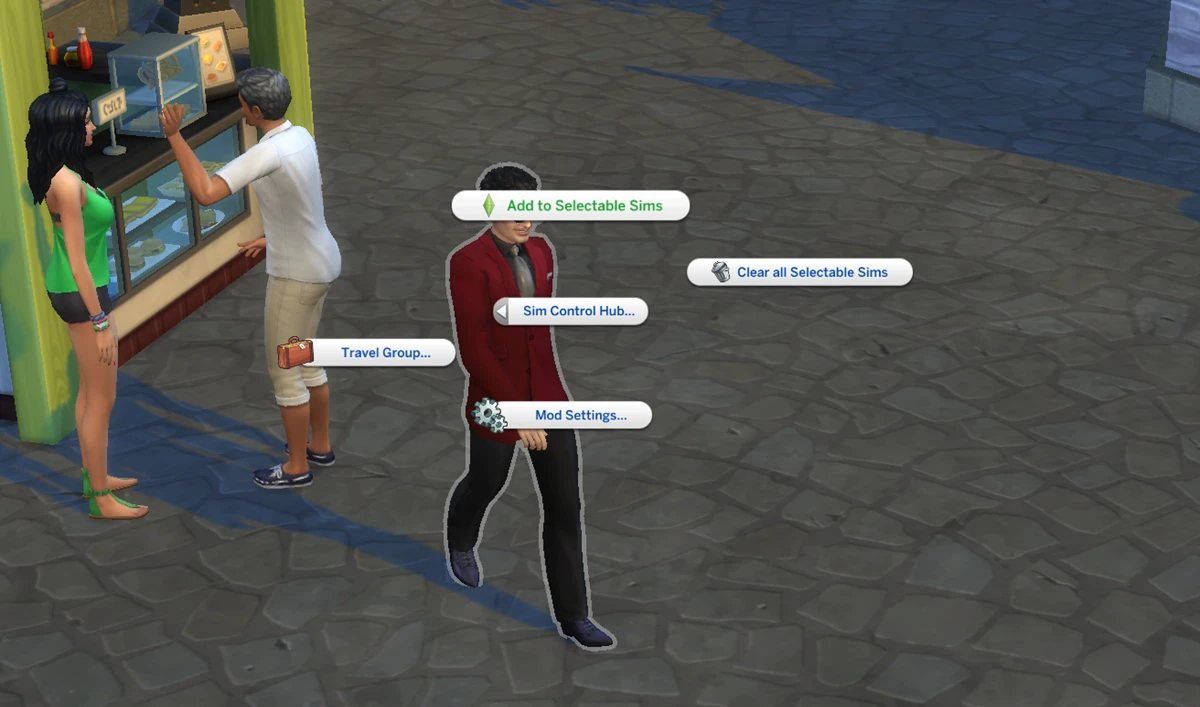
Once enabled, the sim becomes fully controllable. Perform actions like:
- Directing their behavior
- Changing outfits
- Fulfilling needs
- Sending them to work
Basically, you take over all functions available to playable sims.
4. Relationship & Pregnancy Overhaul by Lumpinou
This is a deep and comprehensive Sims 4 gameplay overhaul mod. I love it for its warm, unique moodlets and the enhanced, more realistic pregnancy system in Sims 4.
The mod consists of multiple modules, each expanding a different aspect of sims’ relationships or pregnancies:
M1: Pregnancy & Family Preferences / Reactions / Impact
M2: Fertility & Protection
M3: WooHoo Transmitted Diseases
M4: Paternity Testing & Drama
M5: Teen Pregnancy & Gameplay
M6: Temporary Separations / Relationship Breaks
M7: Cheating (Infidelity) Expansion & Overhaul
M8: Insemination & Surrogacy
M9: Adoption Expansion & Overhaul
M10: Custody & Permanent Separations
M11: Termination of Pregnancy
M12: Pregnancy Side-Effects
M13: Miscarriages & Pregnancy Loss
M14: Pregnancy Tweaks & Special Pregnancies
M15: Romances & Friendships
M16: Dating App: Meet&Mingle!
M17: Charm & Chemistry: Attraction System
M18: Expanded WooHoo: New WooHoo Options
M19: Adult Life: WooHoo Roles, Styles, Drive & Preferences
You can install only the modules you want.
Download this mod from Patreon.
5. Wicked Whims by TURBODRIVER (18+)
Wicked Whims is often known for its adult content, but there’s so much more inside this Sims 4 mod:
- The ability to conduct photoshoots (aligning characters in poses, instant photos without a camera that save to the character's inventory, and posing)
- Sexual health system (periods, fertility, pregnancy, diseases, contraception, etc.)
- Use of romantic animations that are so lacking in the game, as well as animations for character interactions and roleplaying various scenarios
- And, of course, our beloved vibrant and very diverse woohoo
If you’re looking for a safer alternative for family-friendly gameplay or younger players, try Wonderful Whims by the same author, which includes similar non-18+ gameplay enhancements.
For details on installation and setup, check out the full guide.
6. Home Regions by Kuttoe
Frustrated by Sims from Mt. Komorebi randomly turning up at Willow Creek dances? The Home Regions mod is the perfect solution for restricting sims to their native neighborhoods in The Sims 4.
For example, sims who live in Willow Creek will only be seen there, and residents of San Myshuno will only show up in San Myshuno or as vendors/bartenders. The same applies to all Sims 4 worlds.
Download the Home Regions mod from the creator’s website, CurseForge, or Patreon.
Note: If there aren’t enough sims in a world, you might temporarily see many “homeless” sims. No need to worry if you have a populated world.
7. NPCs Everywhere by Kuttoe
This Sims 4 mod spawns bartenders, baristas, market stall vendors, and other NPC staff on community lots and in rental residential buildings.
Download it from the creator’s website.
Key features:
- Service staff won’t appear on regular homes or vacation lots
- On residential rental lots, the NPC will only show up if you install the corresponding object in common areas
- No staff if the lot traits “Private Dwelling,” “Peace and Quiet,” or “Off-the-Grid” are active
- Food and drink employees will automatically clean dirty or empty plates regularly on rental lots
Modules:
1) Market Stalls Everywhere
Place a market stall on a lot, and a vendor will appear from 8:00 AM to 8:00 PM. If two stalls are placed on a lot, two vendors will appear.
2) Baristas Everywhere
Place an espresso bar with coffee machines on a lot, and a barista and customers will appear between 6 AM and 4 PM.
3) Bartenders Everywhere
Place a bar on a lot, and a bartender and customers will appear between 12:00 PM and 3:00 AM. If you place a karaoke machine, sims will sing on it in the afternoon and evening.
For lots that normally have bartenders, adding a second bar object will create a second bartender. This should be useful for creating large bars or bars with exclusive areas.
4) Cafeterias Everywhere
Install a café counter on a lot, and a vendor will serve food from 8 AM to 8 PM.
5) Front Desk
This mod allows you to add a receptionist behind the front desk on any community lot. To do this, place the "Front Desk" object on the lot and put a computer and office chair in its slots. As long as the objects are in place, from 9:00 AM to 5:00 PM a receptionist will automatically appear who will perform duties like answering calls and paging sims through the PA system.
8. Slower Stories by lot51
If you play The Sims 4 on medium or long lifespan, the Neighborhood Stories feature might progress too quickly for your taste. This small mod slows down those NPC world changes so major events happen once a week, not daily keeping your game interesting but less chaotic.
You can download Slower Stories from the author’s website.
Important Tips for Playing with Sims 4 Mods:
— Many mods require script libraries (such as XML Injector or lot51.core) or other dependencies to function correctly. Always install all required mod components for proper functionality.
— Mods often need to be reinstalled or updated after each Sims 4 game update. Make sure your mods and game version are compatible. The easiest way to track mods’ updates is with The Mod List Checker.
— If mods do not appear in Sims 4, check whether modding is enabled in your game settings. Step-by-step instructions for installing mods can be found here.