
Paralives Modding: Full Guides, Steam Workshop, and a First Look at the Main Menu
The developers of Paralives continue their active preparations for early access, now scheduled for May 2026. Earlier we covered the Paramaker livestream where the team showed off character creation. Over the past few days, the team has shared several major updates: they released detailed step-by-step guides for creating mods, gave us a first look at the main menu, and added an in‑game help system. For those who have been waiting for this game, these aren’t just technical details — they’re confirmation that Paralives is approaching release with a fully‑fledged ecosystem for its community.
When Is the Release?
A quick reminder: early access for Paralives was originally planned for February 2026, but the team at Petite Games decided to push the date to May to further polish the game. Judging by recent updates, the extra time is being well spent: the team isn’t just refining core gameplay but also laying the groundwork for the game’s long‑term life after launch. A major focus is community and modder support — something that, as the history of The Sims shows, is essential for any life simulation.
The release is planned for PC and Mac only via Steam; console versions haven’t been announced yet. The early access price will be $39.99, and importantly, the developers have promised there will never be paid DLC — only free updates.
Main Menu: Cozy and Detail‑Focused
In one of the recent modding tutorials, the developers gave us a look at the game’s main menu.
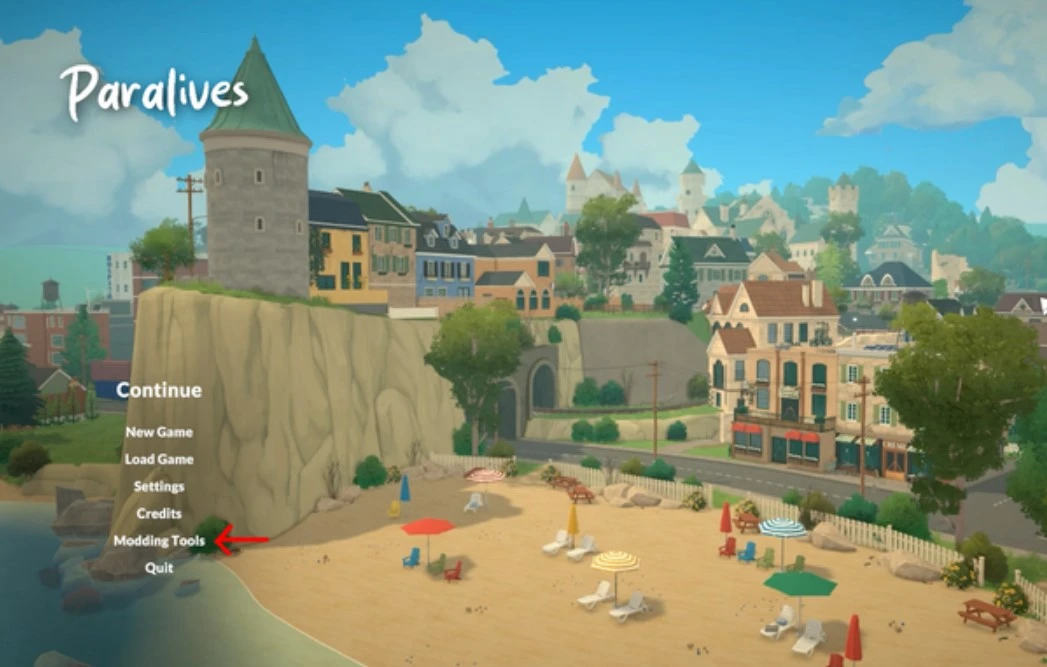
The screenshot shows a view of the coastal town that will be available at launch. The beach is empty, but it’s filled with decorative items: umbrellas, lounge chairs, small details that create a sense that the world lives on even without player input. The visual style remains consistent: bright colors, soft shapes, and that signature “coziness” that made people fall in love with Paralives back in its concept stage.
From this same menu, players can access the modding tools — they’re built directly into the game, a key difference from The Sims 4, where content creation requires third‑party programs.

Modding: Where to Start and What You Can Already Do
The developers have always said they want modding to be an integral part of Paralives. Now those words are taking shape. The official game wiki now has a section with step‑by‑step instructions — it’s still being filled out, but already contains detailed guides on a variety of topics.
An important note: script mods (those that add new logic or fundamentally change gameplay) are not officially supported. The developers explain that with a small team, their priority was finishing the game itself rather than building a complex infrastructure for scripts. However, that doesn’t mean there won’t be any mods. On the contrary, the tools allow you to add, edit, or remove a huge amount of content — from furniture and clothing to sounds, music, and even world parameters.
What’s Already Available for Players
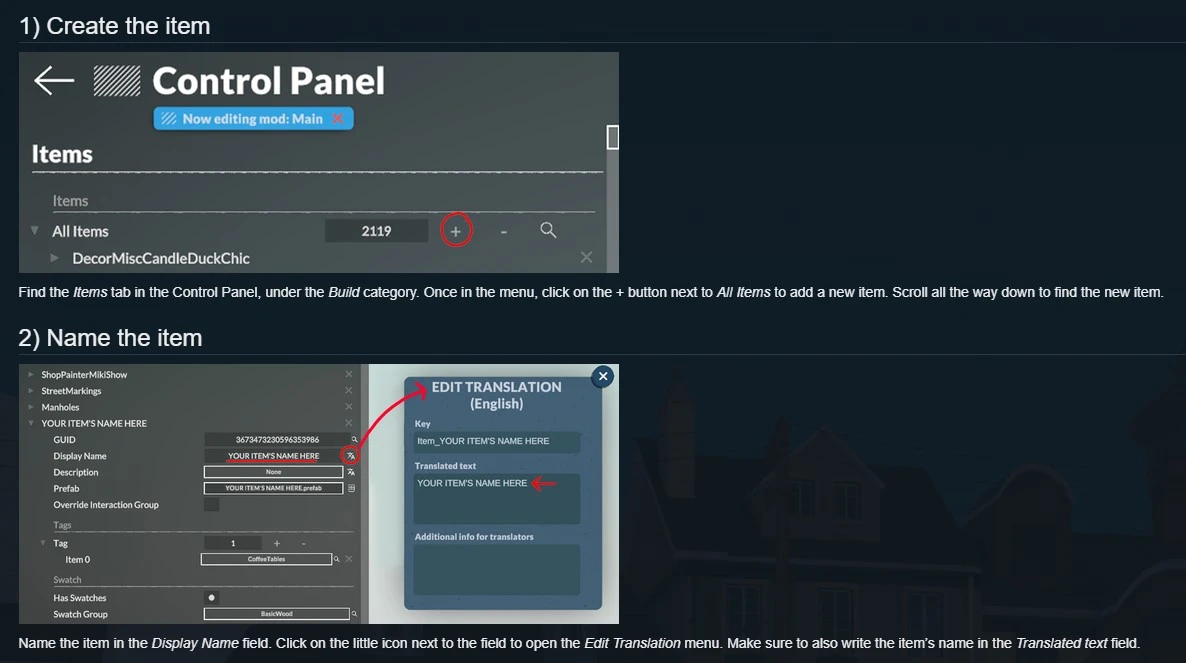
Creating Furniture Items
The guide explains in detail how to add a new object to the game. You import a model (FBX and OBJ formats are supported), set up the bounding box — the blue frame that determines how the object sits on the floor and aligns with walls — add a surface texture, assign a tag (so the item appears in the right catalog category), and set up color swatches. Everything is done through the built‑in Control Panel, which opens with Ctrl+F2.
Creating Clothing Items
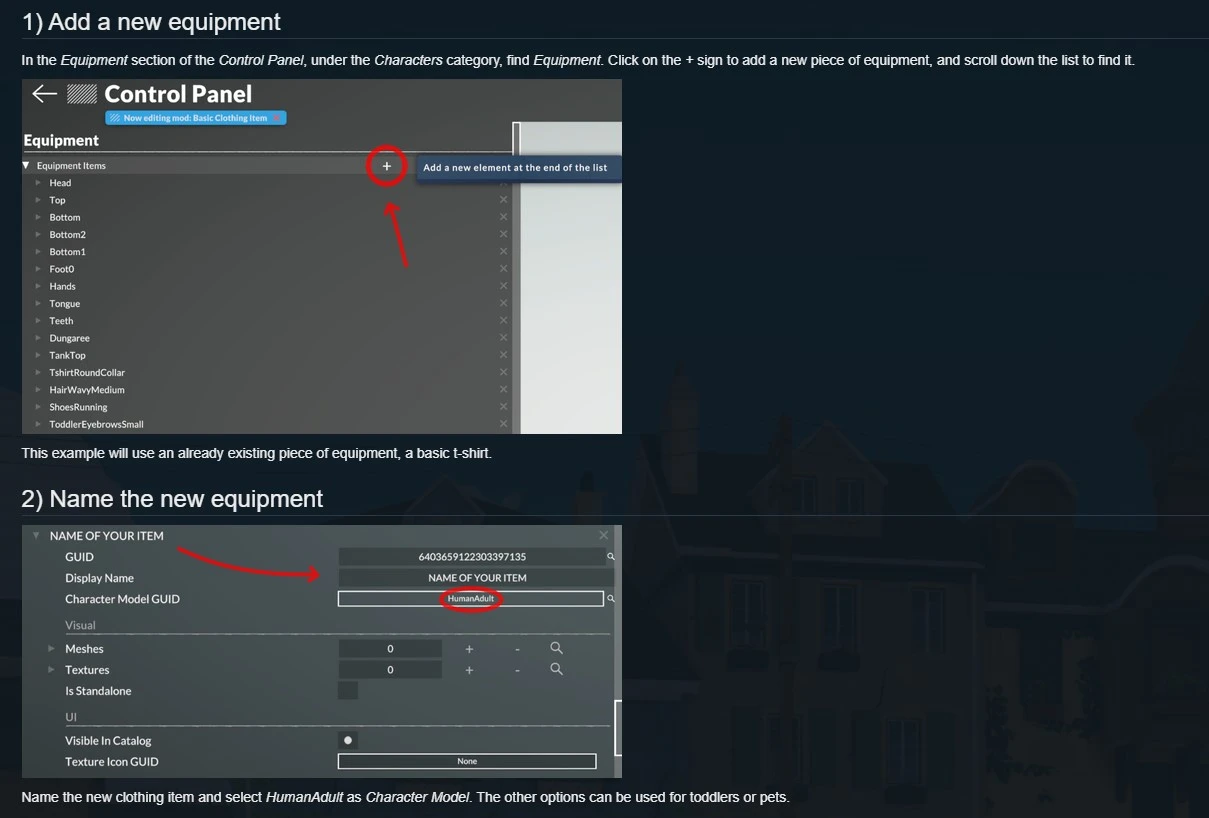
The clothing guide shows how to add a new garment with support for differences between masculine and feminine character models. The developers explain how to add two versions of the texture (for chest and no‑chest), how to set the ZOrder Layer — the layering order of clothing items — and how to add tags so the item appears in the right categories (e.g., “Tops” and “Casual Shirts”).
Changing Sounds and Adding Music
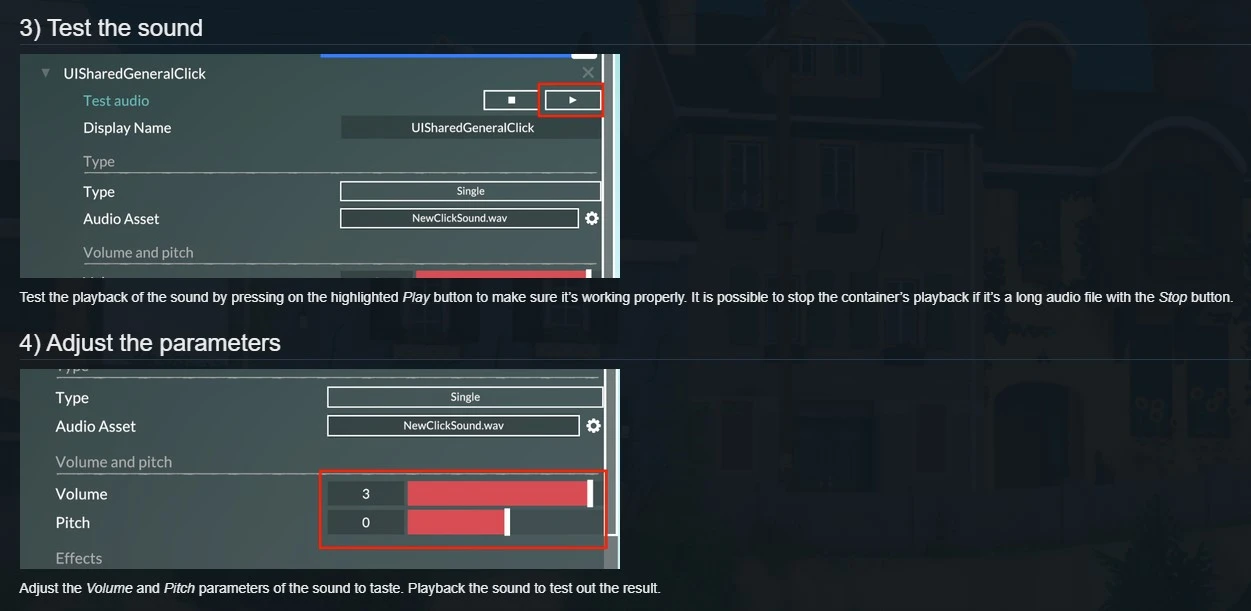
Audio guides demonstrate how to change any sound effect in the game, from interface clicks to background music. You open the Audio section of the Control Panel, find the audio container you want (e.g., UISharedGeneralClick), replace the audio file (OGG, MP3, WAV supported), and adjust volume and pitch.
Creating a Mod and Uploading to Steam Workshop
A separate guide covers packaging a finished mod and publishing it to Steam Workshop. You create a mod folder, add all necessary files, choose a square preview image (under 15 MB), then use a special button in the game’s main menu to upload it to Steam Workshop. Once published, players can subscribe to the mod and receive updates automatically. Compared to how mods work in The Sims 4, this sounds almost too good to be true.
What You Can Modify
- Textures (PNG, JPG)
- 3D models (FBX, OBJ)
- Animations
- Sounds (OGG, MP3, WAV)
- World parameters: time speed, economy, social interactions, need decay rates
- Materials, colors, and post‑effects (you can change the game’s visual style)
- Up to 25 tracks in the playlist for each game mode
What’s Not Possible (Yet)
- Interface: layout, style, and colors of UI windows (developers explain this is too complex and resource‑intensive for open access)
- Script mods that fundamentally change gameplay logic
Why Modders Are Already Starting to Move to Paralives
Alongside the release of the guides, the developers have made character rigs, body textures, and animation sets publicly available. This means content creators can start working on their first Paralives mods right now, without waiting for the game to launch.
For many modders, this is huge. Unlike The Sims 4, where creating custom content requires third‑party programs, learning specific formats, and constantly working around limitations, Paralives offers official tools built directly into the game and a unified mod distribution hub — Steam Workshop.
In‑Game Help: Built‑In Assistance
On March 24, the developers posted another update on X: Paralives now has a built‑in help system — a “handy help menu”.
It’s not just a link to an external wiki, but a full menu inside the game that, judging from screenshots, explains how different mechanics work and what’s happening on screen. This is especially valuable for newcomers — Paralives will have many systems that even seasoned Simmers might find unfamiliar.
Community Reaction and Comparison with The Sims 4
The modding news sparked lively discussion. Many are comparing Paralives’ approach to what EA did (and didn’t do). The Sims 4 launched in 2014 without many core features the community had been asking for years, and its modding ecosystem grew organically thanks to the efforts of players themselves. Paralives, by contrast, is building community support as a priority from the very beginning.
However, there are also measured takes. On Steam forums, users discuss the lack of official script mod support. One commenter wrote: “If modders like that crazy guy Sacrificial can make insane mods that feel like expansions, that’ll be the deciding factor for me to buy”.
In response, the developers confirmed that scripts aren’t a priority right now but didn’t rule them out for the future: “We know that more complex behaviors may require scripts, so we’re still considering adding script mod support down the line”.
How to Prepare for the Game’s Release
If you’re planning to try Paralives right after launch, or even start creating content in advance, here are a few tips:
Download the rigs and textures. The developers have released them publicly — you can start modeling items and clothing now.
Study the guides. The official wiki already has detailed tutorials on furniture, clothing, sounds, and music.
Wishlist the game on Steam. This helps the developers gauge interest — early access begins May 25, 2026.
Follow the developers. They regularly post updates on Discord and Patreon, and many important details appear there first.
Try making your first mod. With the built‑in tools, it’ll be much easier than in any other life sim.
For those tired of endless expansions, expensive Moola currency, and a closed ecosystem, Paralives feels like a breath of fresh air. The game will have no paid DLC, its modding tools are built right in, and content distribution goes through Steam Workshop — a familiar and convenient platform.
Yes, at launch there will be less content than The Sims 4 with its 12‑year backlog. But Paralives has something its competitor lost long ago: openness, transparency, and a willingness to share the tools the developers themselves use. For the first time in a long while, the life simulation genre has a real alternative built on fundamentally different principles — and the community is responding with genuine enthusiasm.



