The Sims 4 Build Mode Secrets: 11 Tricks Most Players Don't Know
The Sims 4's build mode is like an iceberg: most players only ever see what's poking above the surface, with no idea how much is hiding underneath. Garden beds and sandboxes made from fence trim, calendars and drawings stuck right on the fridge door, cabinet doors used as wardrobe fronts – all of it is doable with the game's standard tools, no mods required. This article rounds up tricks and ideas that will change the way you think about building and decorating: from non-obvious keyboard shortcuts to creative solutions dreamed up by the Simmers community.
Recently, we put together an article with tips on how to get into building — where to actually start and how to dodge all the mistakes everyone tends to make. If you're new to building in The Sims and are itching to level up your skills, check it out at the link.
1. Décor on the fridge and furniture
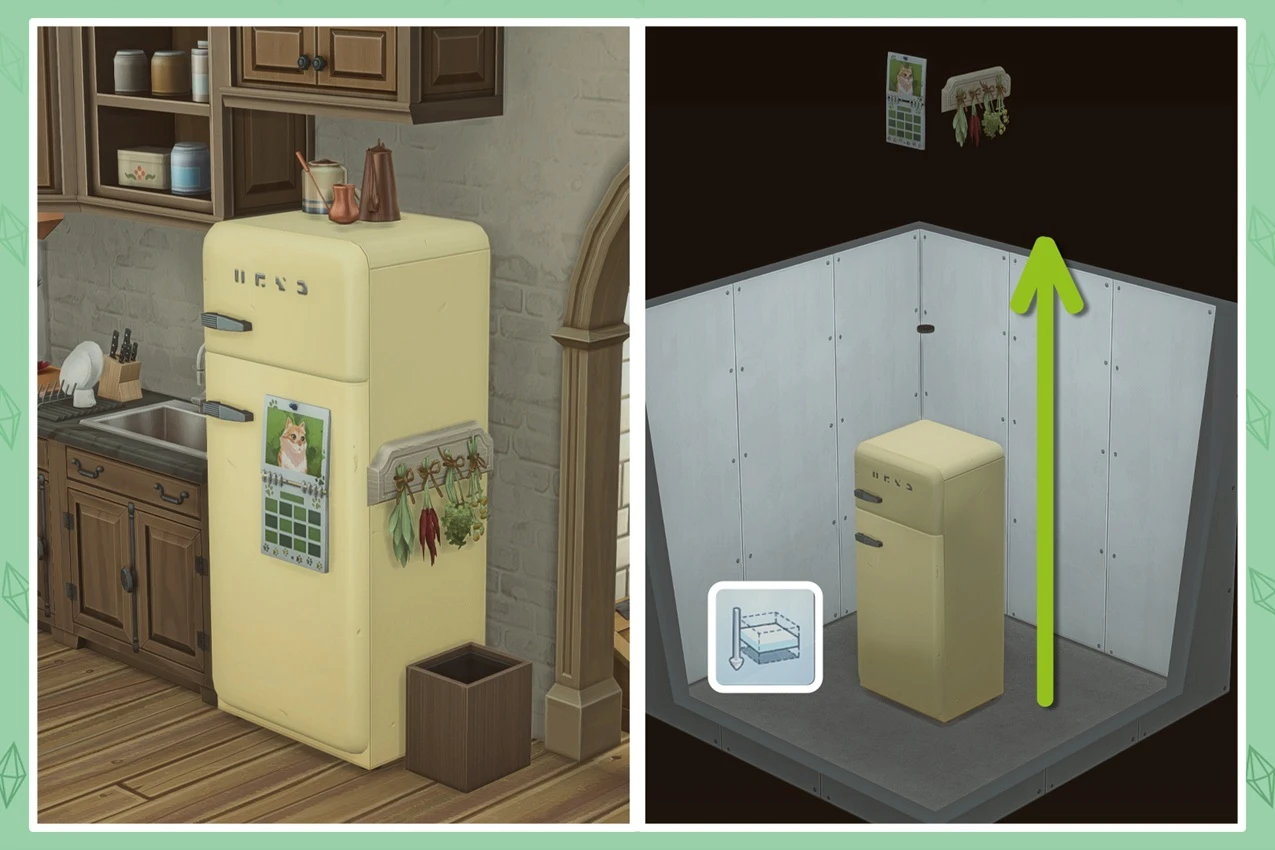
Want your interiors to feel more lived-in? Nothing does the trick like little personal touches on the fridge or the cabinets – drawings, notes, magnets, that kind of thing. And pulling it off is easier than you'd think.
How to do it
1) First thing's first – a must for any unconventional object placement: open the cheat console with Ctrl + Shift + C and type bb.moveobjects on. This lets you place items freely, without snapping to the grid or walls.
2) Build a basement directly beneath the fridge. Toss in a light bulb so you can actually see what you're doing.
3) Place a copy of your fridge down in the basement and open up some space in front of it and on the sides. The key is that this fridge needs to sit exactly below the one in the kitchen above.
4) Build a small wall right in front of the main "upstairs" fridge. It'll automatically drop down into the basement and appear in front of the lower one. Hit undo – the wall disappears. Stay in the basement.
5) Add your décor: pick a drawing, a calendar, a corkboard, whatever you like, and place it as if you're hanging it on the wall in front of the basement fridge. Then use the 9 key to raise it up until it lands right on the original fridge upstairs in the kitchen.
The same trick works for decorating the side of the fridge – just build your temporary wall on the side instead.
2. Garden beds, flower beds, and a sandbox made from fences
Turns out fences aren't just for fences. You can use them to build tidy decorative garden beds, flower beds, and even a fully functional sandbox right in your yard.
The idea is simple: lay out a closed rectangular border using low fences, then fill the inside with whatever ground texture you want. From there, it's all up to you.
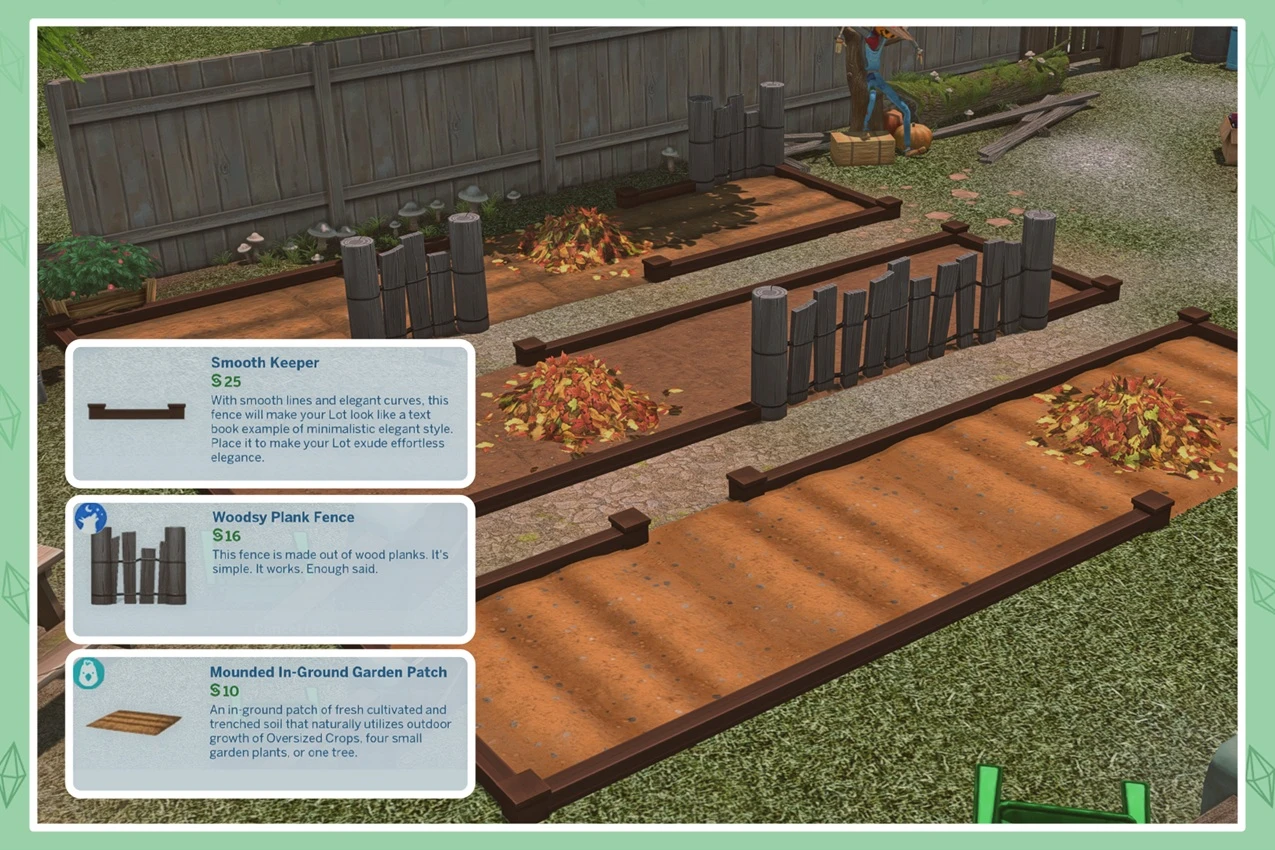
What you can put inside:
— Functional garden beds: place regular garden plots inside your little enclosure and you've got yourself a proper raised garden bed that actually works.
— Decorative flower beds: fill it with flowers and plants, paint the ground to look like bare soil.
— Sandbox: and this isn't just for show, it's a fully working game mechanic. Place the fence around the perimeter, then head into the landscaping tools, select a sand texture, and paint the ground inside the enclosure. That's it – the sandbox is ready to go. Sims will use it just like any other sandy spot: playing, building sandcastles, digging around. Toss in some kids' toys for extra effect.
3. An invisible shelf for perfect décor placement
If you love cluttering surfaces with small decorative items but you're sick of manually lifting each piece to just the right height, this mod is for you. OMSP Shelf by amoebae is an invisible shelf with multiple slot sizes that mounts on a wall and slides smoothly up and down when you hold Alt, letting you lock in the exact height you need. Place the shelf once, then arrange an entire group of items on it without fussing with each piece individually. It's an absolute game-changer for detailed interior work – especially in kitchens, above countertops, and on fridges.
4. An atmospheric chimney on the outside of your house
The Sims 4 doesn't come with ready-made exterior chimneys that actually look like they belong on a house – just bland built-in fireplaces with nothing to show for themselves on the outside. But that's an easy fix you can pull off yourself.
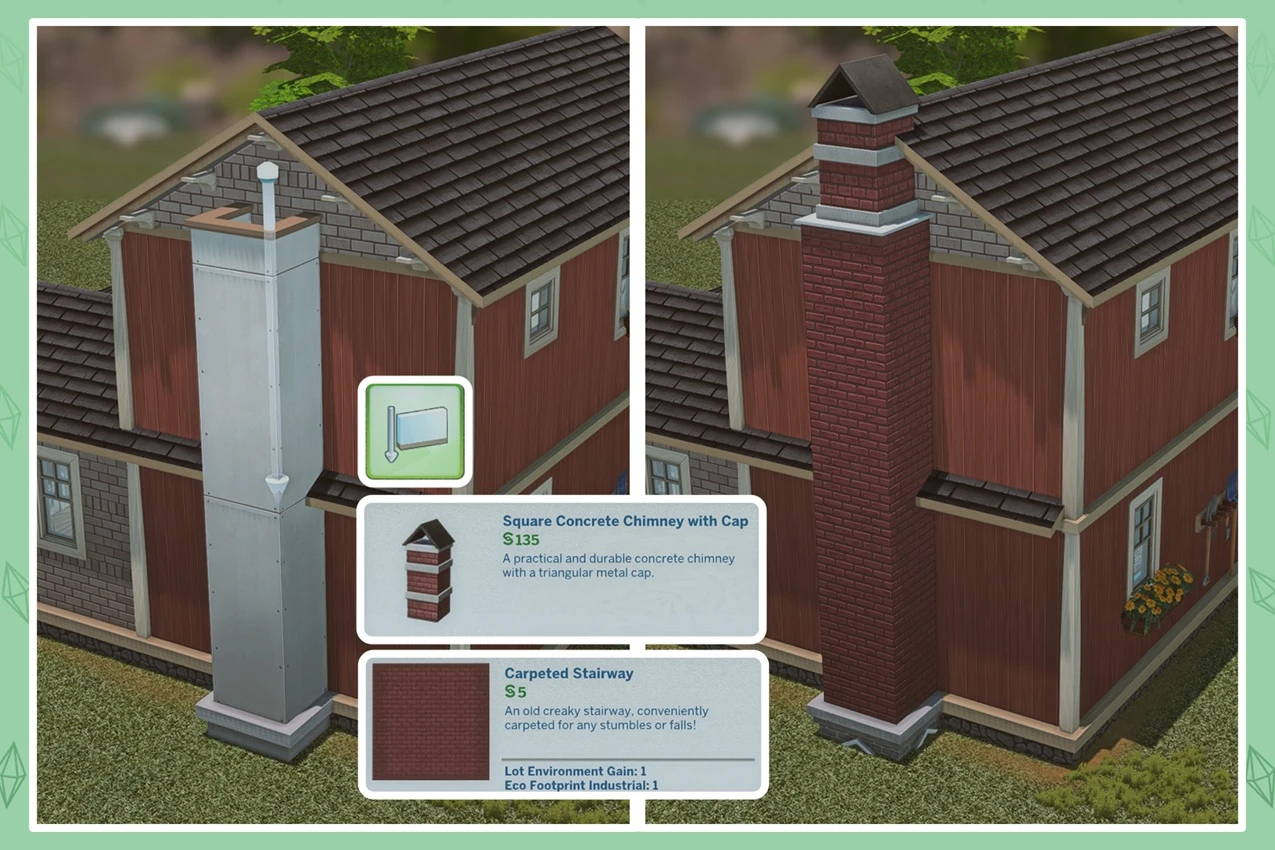
How to do it
Everything is built out of regular walls – no mods needed. On the exterior wall of the house, attach a narrow section that runs from the ground all the way up past the roofline. Finish it in brick or stone, which instantly gives it the right character and makes the bump-out read as a real chimney. Then dress up the top. A decorative trim piece, a cornice, or something you dig up in the catalogue all work great here.
5. Fences with personality
A plain fence running in a straight line is flat and forgettable. It gets a lot more interesting when you start mixing it with other building elements.
Try breaking up the fence sections with small brick piers or decorative posts – you end up with a layered structure that looks far more substantial and refined. A brick base gives the fence a sense of weight and permanence, while a wrought-iron or lattice top half keeps it feeling open and airy.
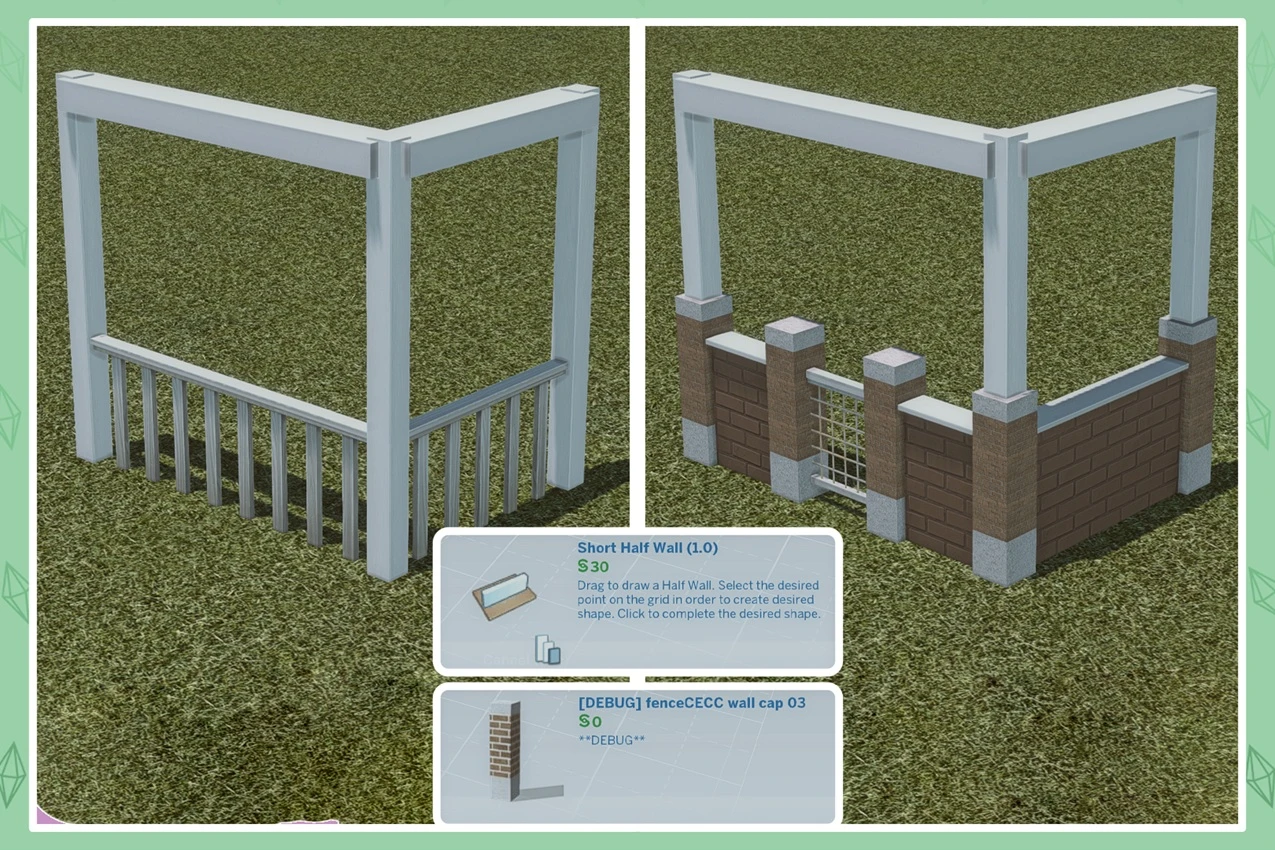
This approach really shines at the corners of a lot – that's where a mixed fence looks its most polished and architecturally complete.
6. Adjusting only one side of a roof
Not many people know this, but there's a really handy trick hiding in build mode when you're working with roofs. If you just drag a roof edge normally, it adjusts symmetrically on both sides. But hold Shift while you drag, and the change applies to only one slope.
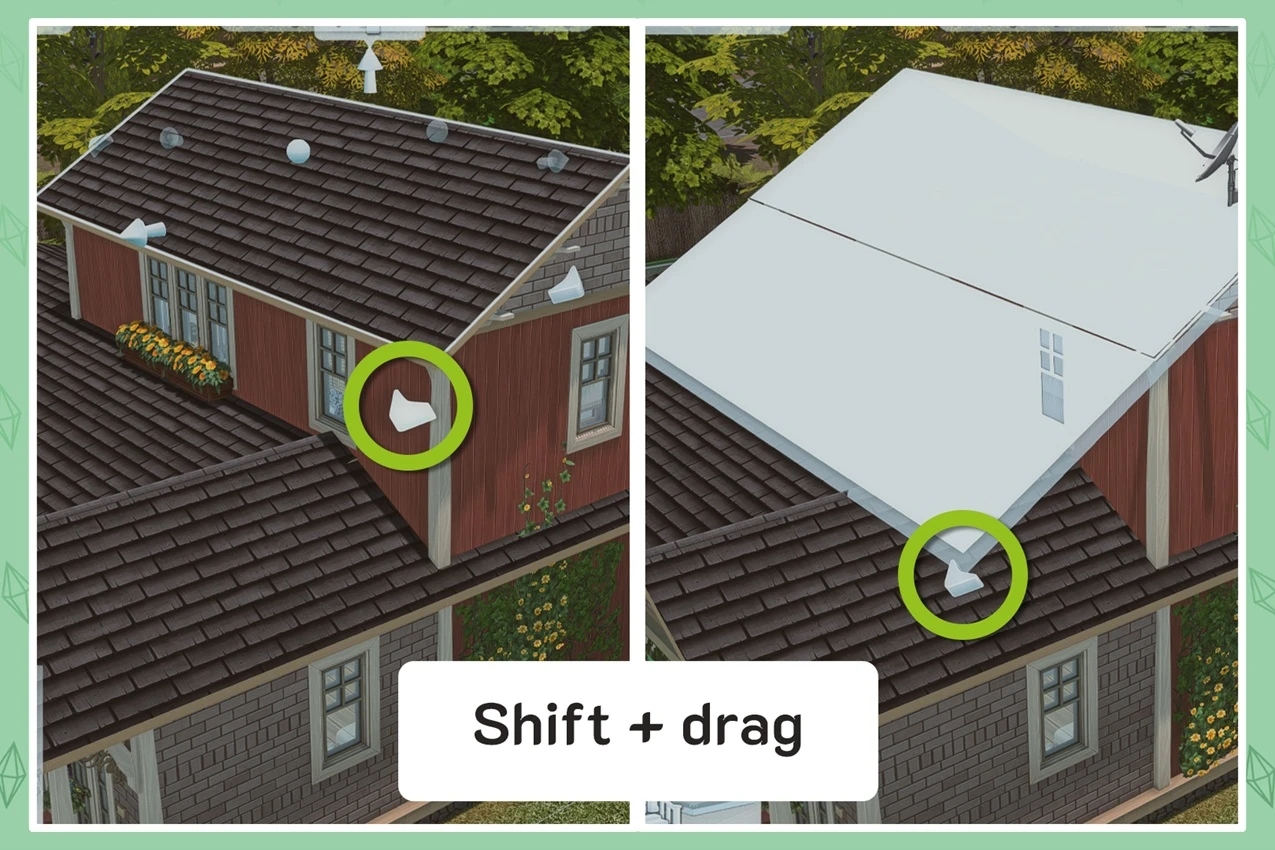
This opens up a ton of possibilities for unconventional shapes: asymmetrical roofs, overhangs at different heights, multi-level structures – all of it is suddenly within reach with a single key. It's especially useful when you need to fit a roof to a complex floor plan or bring together multiple roof sections of different heights.
7. Quick placement of identical objects
If you need to place a bunch of the same item – flowers along a path, chairs, lanterns around the perimeter of a lot – you don't have to go back to the catalogue every single time. Just hold Shift while placing an object and it'll stay "in your hand," letting you drop as many copies as you want, one after another.
This trick is absolutely invaluable for landscaping: filling a flower bed, lining up a row of bushes along a fence, or scattering décor all across the yard now takes seconds.
8. Doors on cabinets and bookshelves
Looking to add something unexpected to your interior? Try placing a regular door directly on a bookshelf or wardrobe. It looks striking, it looks unique – and leaving one door open adds an extra touch of charm.
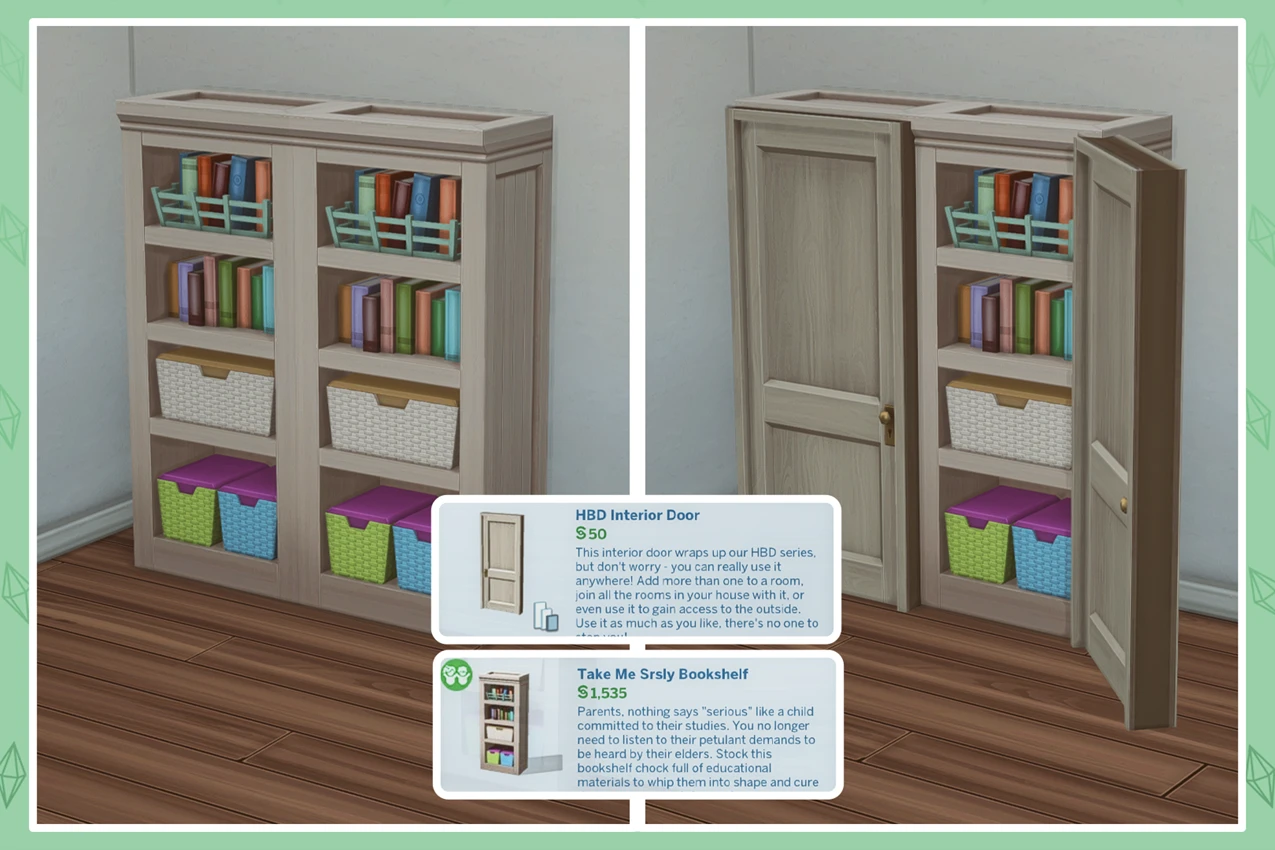
The big win here is that the game has far more door options than it does cabinet fronts. Different styles, materials, colors – all of it gives you a level of furniture customization you just can't get otherwise. And it works equally well on bookshelves and wardrobes alike.
How to do it
1) The usual first step for any unconventional object placement: open the cheat console with Ctrl + Shift + C and enter bb.moveobjects on. This lets you place items freely, without snapping to the grid or walls.
2) Place your cabinet or bookshelf where you want it.
3) Delete the wall behind it – otherwise the door won't sit right.
4) Pick any door you like from the catalogue and place it directly on the cabinet.
If you want, you can add a second door next to it, cover the cabinet completely, or angle one door open – to do that, place a wall at an angle on the side of the cabinet beforehand. It looks incredibly atmospheric.
9. A fence next to the house without a foundation lift
When you place a fence right up against a house wall, it automatically picks up the foundation height and rises with it. Sometimes you just want a plain fence sitting flat on the ground – and it's a very easy fix.
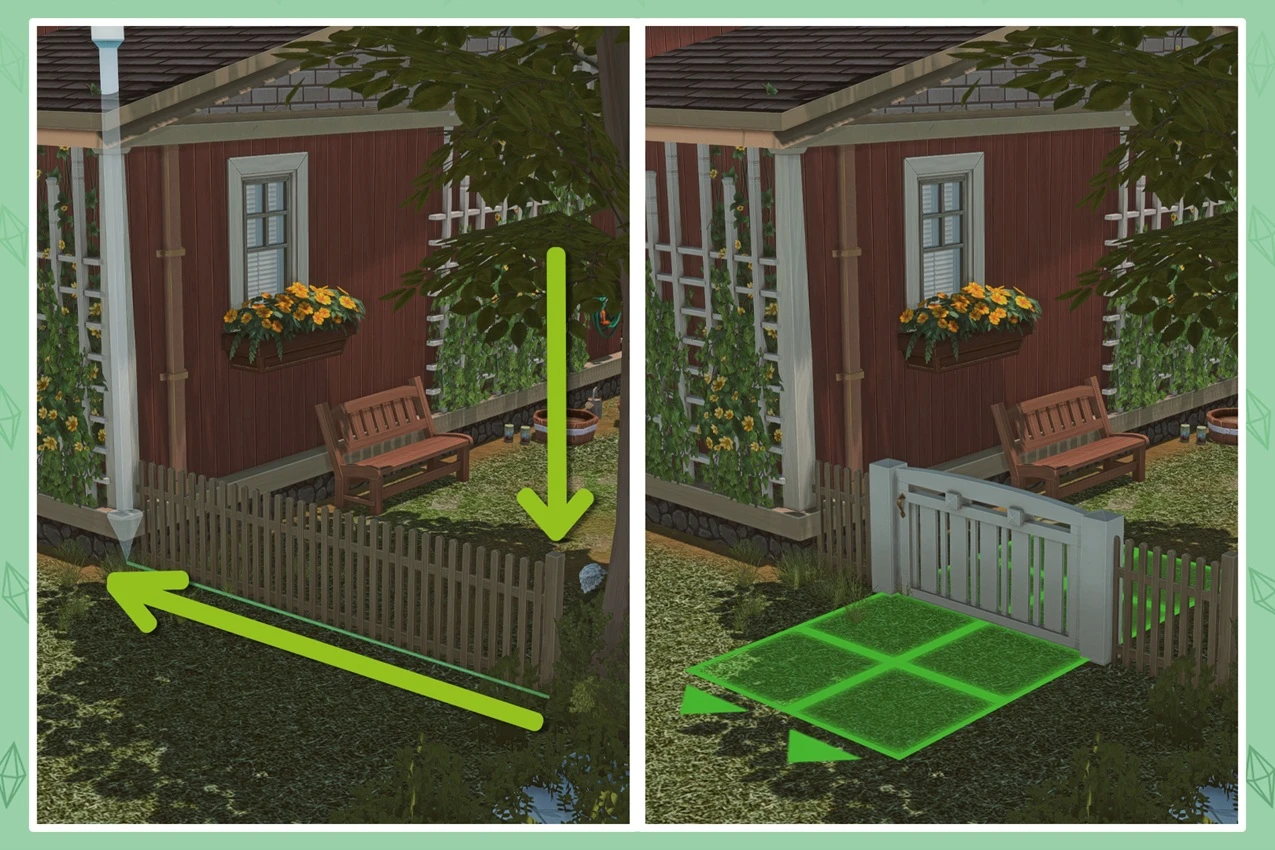
Simply start drawing the fence from an open spot on the ground rather than from the house wall, and it'll sit right at lawn level with no extra height. As a bonus, it's much easier to add a gate to a foundation-free fence – another little perk of this small trick.
10. The gear icon in kitchen sets – a secret design tool
For years we've been dropping the same rectangular base cabinets without ever realizing the developers hid an entire modular system right inside the kitchen sets.
When you select any kitchen unit – a base cabinet, a wall cabinet, a tall pantry – look for the gear icon in the object selection menu. Click it, and a whole set of additional shape options opens up: corner sections, rounded ends, end panels, full-height versions that go all the way to the ceiling, and much more.
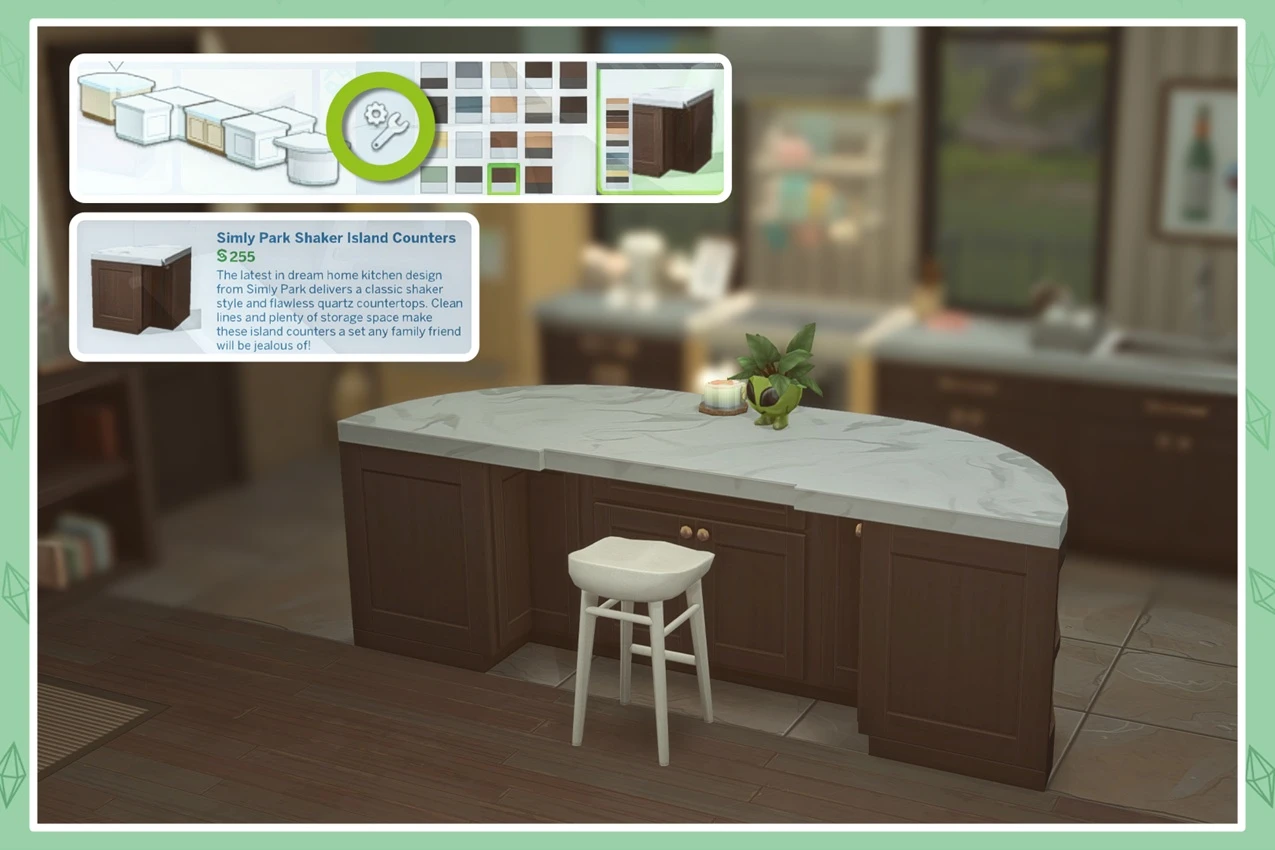
It works for both floor and wall cabinets, and it genuinely unlocks a whole new level of kitchen design that most players have absolutely no idea exists.
11. Fences on round platforms
A lot of people assume it's impossible to run a fence along a round or curved platform edge and just give up on the idea entirely. In reality, it's completely doable – not every fence type handles curves, but plenty do.
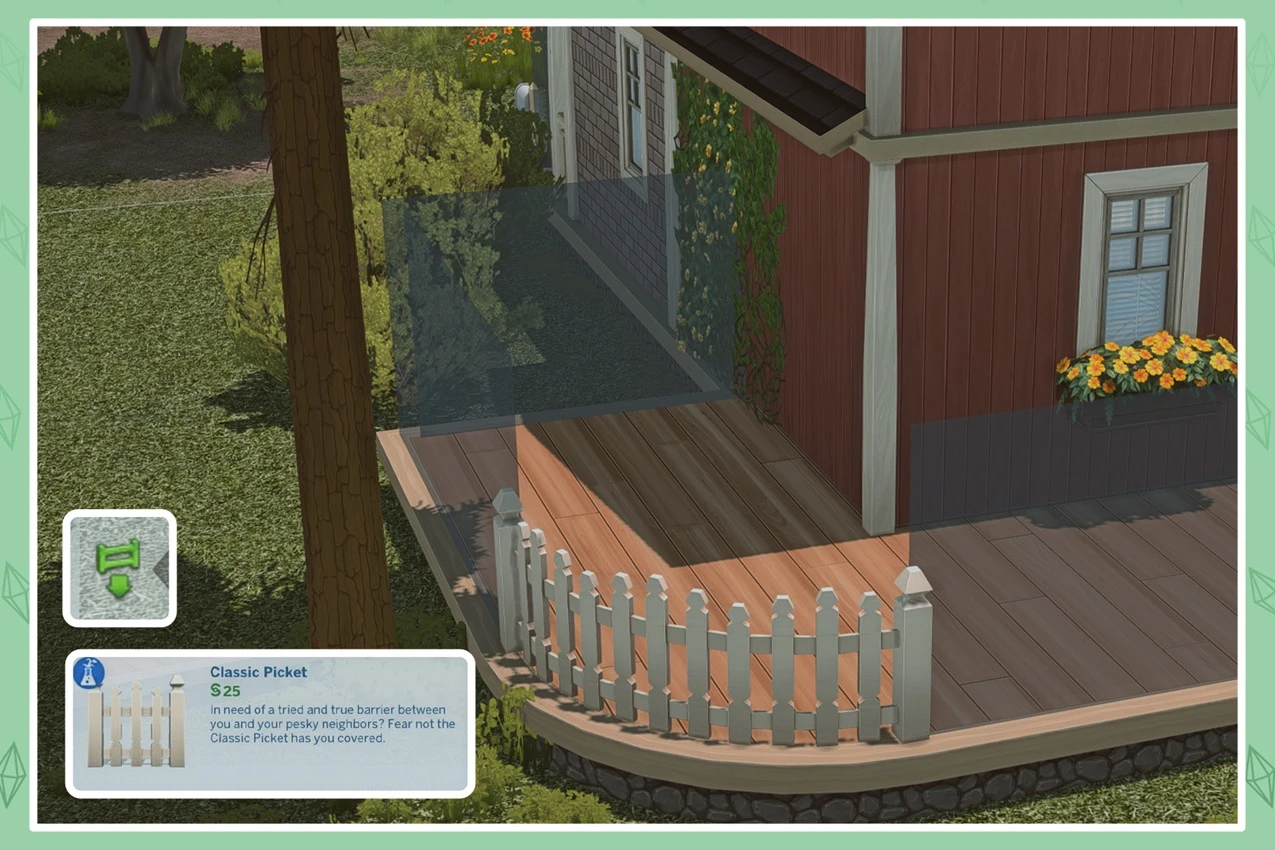
There's no definitive list of which ones work, so just browse through the catalogue and test them directly on the platform. The ones that support curved edges will wrap around it cleanly right away – pick whichever fits your style best from that selection.