The Sims 4 Genetics Overhaul by SonozakiSisters: Grandparents, Skin Tones & Age-Up Fixes Explained
Genetics in The Sims 4 is a sore spot for anyone who's ever tried to build a good-looking dynasty. Kids come out with random chins, inherited hair color doesn't match the actual hairstyle, grandparents might as well not exist as far as appearance goes, and when Sims age up into adults, their faces can change beyond recognition. The community has long been waiting for a mod that would tackle all of these issues in one shot – and it looks like that mod is finally here.
The Genetics Overhaul Collection is arguably the most comprehensive, systems-level approach to genetics in The Sims 4 to date. It's not a single mod but a full collection of three independent modules, each targeting a different piece of the problem. SonozakiSisters didn't just slap together a mod to patch the obvious gaps in gameplay – she dug deep into how the genetics system works under the hood, tracked down specific bugs in EA's code, and came up with creative workarounds that go well beyond the obvious fixes.
We tested the mods in-game and also reached out to the creator directly – details below.
Here's a quick rundown of what the collection can do:
- Children inherit traits from their grandparents.
- Dyeing hair or swapping contacts no longer breaks genetics.
- Occult eyes are inherited correctly.
- You can configure the chance of occult mutations.
- The mod saves data for every newborn.
Let's take a closer look at each mod.
Why three mods instead of one?
Before breaking down each module, it's worth explaining the reasoning behind the split. The creator deliberately made the collection modular: all three parts are independent of one another, don't conflict with each other, and can be used in any combination. That's genuinely convenient – say you're happy with how the game handles skin tone inheritance but annoyed by the random genetics on aging up, you just install the one module you need. Want the whole package? Grab all three.
The reason there are three separate modules is that they touch fundamentally different parts of the game's code and address different aspects of the genetics system. Technically, they could be bundled into a single file, but that would cost users the flexibility to mix and match.
Module One: Main Mod — the backbone of the whole system
This is the core and most complex module in the collection. It's the one that rewrites the key mechanics of appearance inheritance. Let's break down each feature in detail, including the technical side that the creator shared with us directly.
Grandparent inheritance
Let's start with something that flat-out doesn't exist in the base game. When The Sims 4 creates a child, it looks at exactly two people – the parents – and that's it. Grandparents aren't factored in at all. If a child ever looked like their grandmother, that was pure coincidence: the game just happened to randomly pull a similar preset.
The Main Mod changes this at a fundamental level. Now every appearance attribute has three possible sources: Parent 1, Parent 2, and grandparents. The default probabilities look like this:
- 80% – inherited from a direct parent
- 10% – from one grandparent
- 10% – from the other grandparent
One important detail: these chances apply to each attribute independently. That means one child might get their nose from their paternal grandmother, their eye color from their maternal grandfather, and their voice and skin tone from their parents. That's exactly the kind of logic that produces genuinely unique Sims – ones where you can see the whole family in their face, not just mom and dad.
All of these numbers are adjustable. If you want grandparents to have more or less influence, you can tweak it right in-game through the settings menu.
There's also a built-in fallback for Sims who don't have a complete family tree. If a parent has no parents of their own, the mod simply uses only that parent's genetics. If only one grandparent exists, their chance rolls up to the full 20% instead of being split 10+10.
In-game settings
Prior to version 1.1, the mod's settings had to be edited manually through a JSON file – not exactly user-friendly. Starting with version 1.1, everything has been moved directly into the game: Shift + click on any Sim → Genetics Overhaul Settings.
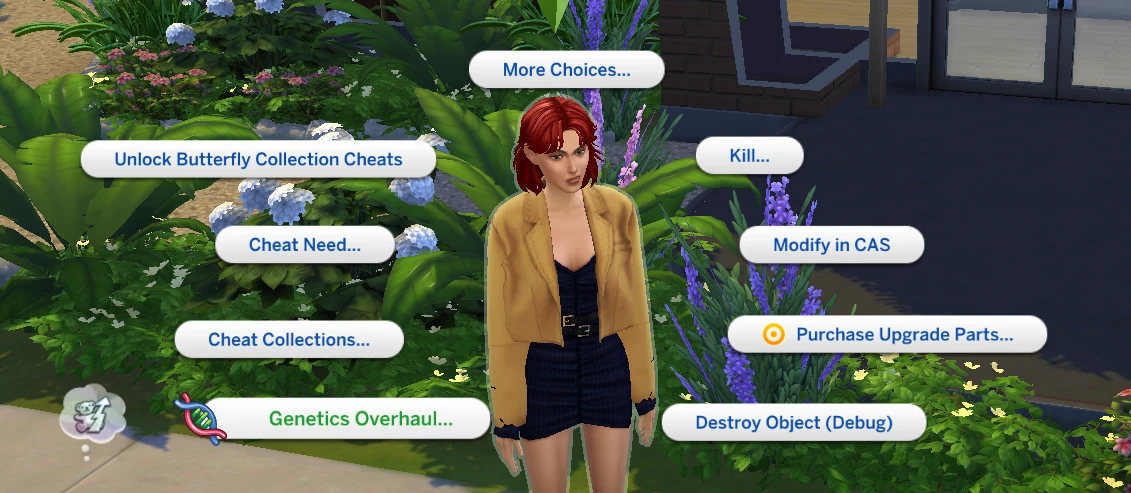
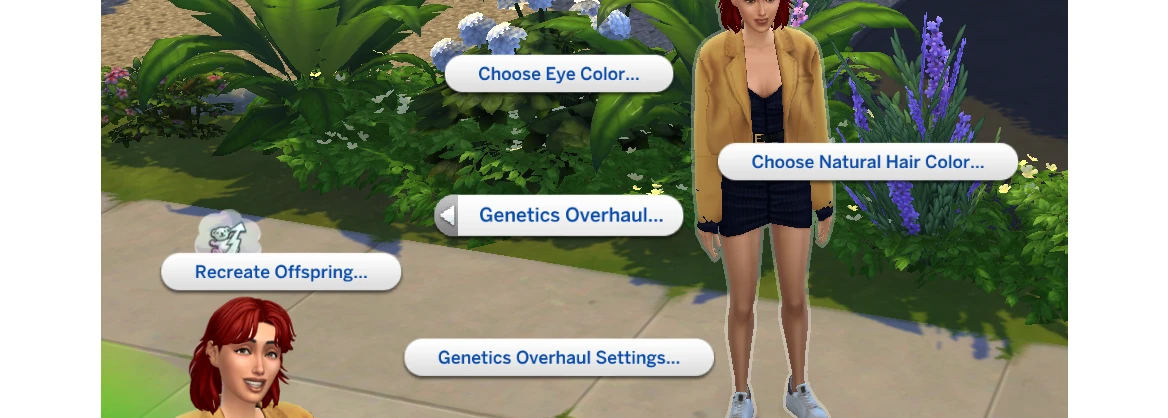
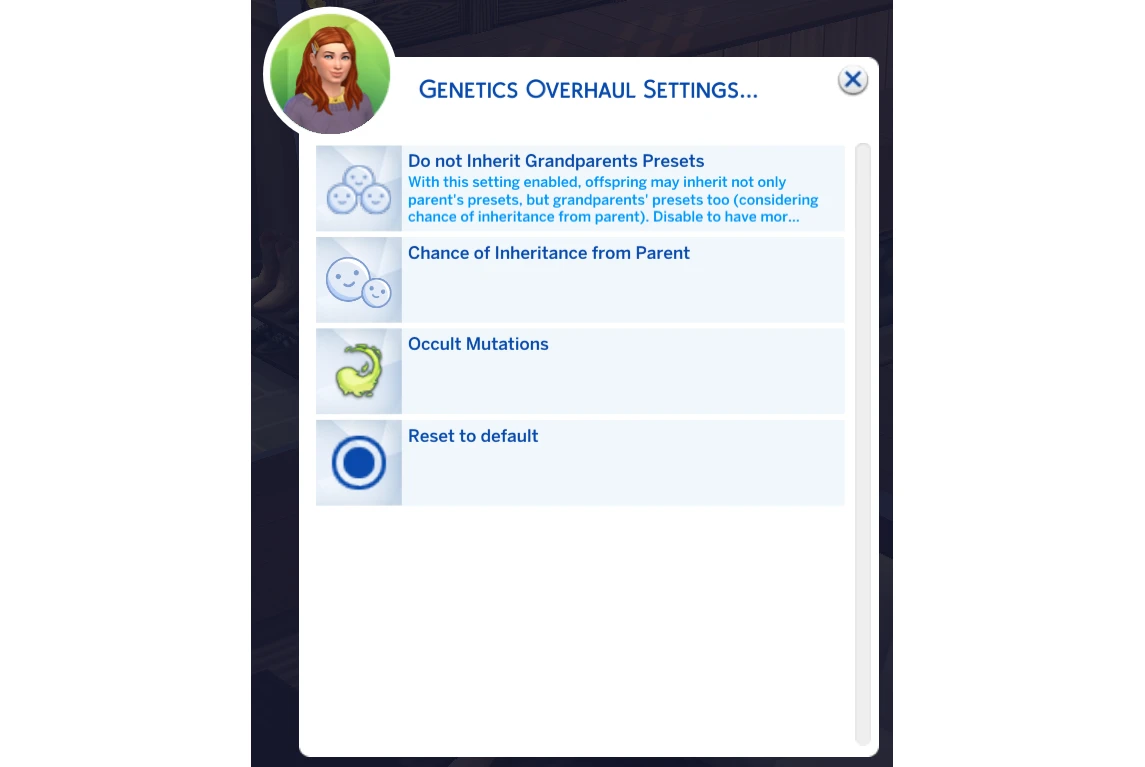
The menu includes:
- Chance of Inheritance from Parent – the probability of inheriting from a direct parent (0 to 1). The remaining chance is automatically split evenly between grandparents.

- Inherit Grandparents Presets – off by default. When enabled, face and body presets can also come from grandparents, not just hair color, eye color, and skin tone.
- Occult Mutations – per-occult-type mutation settings, configured individually.
The grandparent preset option is off by default for a reason: if you want predictable face shape inheritance, it's best to leave it that way. It's worth turning on if you're open to more variability and the occasional surprise.
To restore everything to its original state, just hit Reset to Default in the same menu.
Natural Hair and Eye Color: How It Works Under the Hood
The problem with the base game is that it doesn't distinguish between a Sim's "biological" hair color and a dyed one. Dye your Sim's hair red, and as far as the game is concerned, they're genetically a redhead now – and their kids will inherit that red. Put a CC wig with purple hair on them, where every swatch is built from a single black template, and all their children will end up with black hair. Zero logic.
But why does this happen with CC specifically? SonozakiSisters explained the mechanics in detail:
"Creators sometimes build content from a single swatch, copying it from one slot to another, so all swatches end up with the same color tag – say, a black hair tag – even if the selected style looks blonde."
And this breaks more than just genetics. When a Sim has hair and eye color preferences set, the attraction system also calculates based on those tags. A wrong tag means attraction is calculated wrong. So a single botched swatch in a CC hairstyle can break several game systems at once.
The mod handles this by scanning every playable Sim's hairstyle and eyebrows at game startup, reading their color tags, and saving the "natural" color as a separate parameter – independent of whatever the Sim is currently wearing. That's the value that gets passed on to children at birth, not the hairstyle tag.
"The mod stops Sims from inheriting color tags at birth. Instead, they inherit custom hair and eye color traits, and it's from those traits that the right color gets assigned when the child ages up. That's also why you can freely change hairstyle and eye colors in CAS – color tags no longer play any role in genetics."

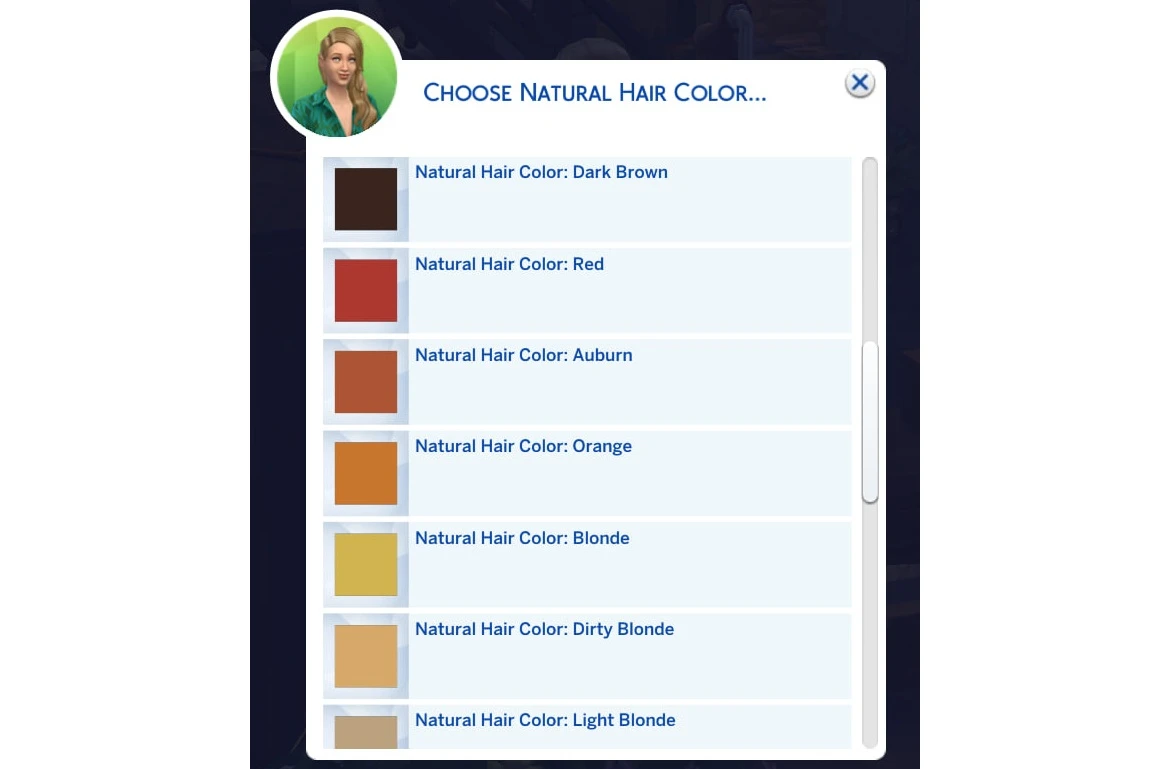
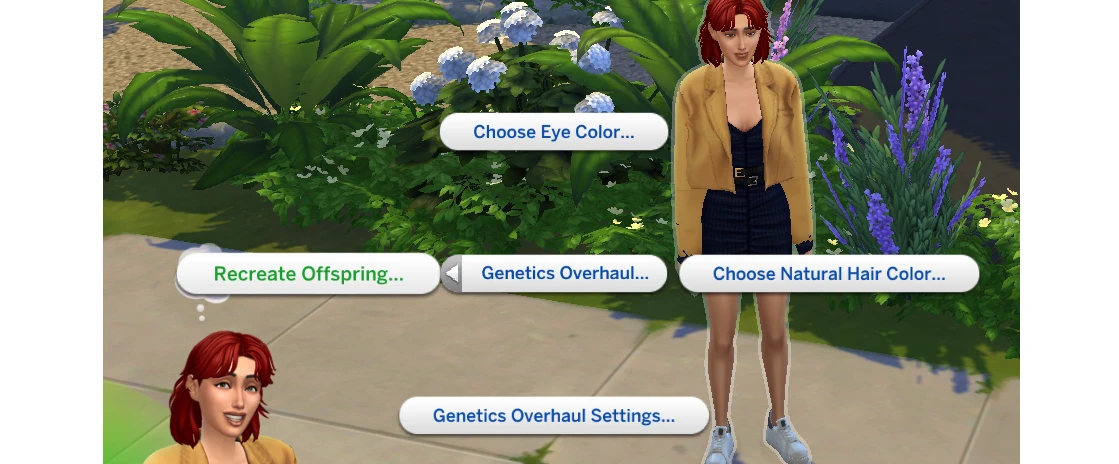
The scanning priority goes: hairstyle → eyebrows → body hair. If none of those have a readable tag, the mod will prompt you to set the color manually via Shift + click → Choose Natural Hair Color / Choose Eye Color. That same menu comes in handy if the auto-detection got it wrong or you simply want to override the natural color yourself.
This system doesn't extend to pets, and again, for a clear technical reason. Pets don't have "hair" in the same sense Sims do – instead, they have a fur color pattern that's generated in a completely different way, through blending the parents' colors together. The creator would love to improve that system too, but it's been shelved for a future update.
Occult Eye Color: The Story of an Old Bug
This one goes back to a problem EA introduced a long time ago and never got around to fixing. About a year ago, the developers released a patch that let any Sim use any occult eyes regardless of their life state – before that, for example, vampire eyes were exclusive to vampires. Seemed like a nice update. But here's what SonozakiSisters explained to us:
"The old bug was never fixed – namely, the missing color tags on occult eyes. They only exist on the vampire swatches; everything else only has an occult type tag. So if a child inherits non-vampire occult eyes, the game just picks a random occult color or defaults to plain human brown, which is the game's fallback."
In other words, EA opened up occult eyes to all Sims but never actually fixed how those eyes are inherited. The result? Kids with mermaid, fairy, or werewolf occult eyes would end up with either a random occult color or just the standard brown.
The Main Mod works around this by storing the specific ID of the parent's eye color instead of relying on a tag, then passing that exact ID on to the child. The kid ends up with the exact same eyes their mom or dad had.
There's also a separate edge case: some occult eye styles simply don't have a child version in the game's assets at all. For those, the mod works in two stages – at birth, the child gets a similar regular color, and when they age up to a teen, they receive the correct inherited one. For those rare cases where the swap didn't trigger on aging up, there's a cheat for that: Force Update Eye Color.
Unnatural Hair Colors for Children
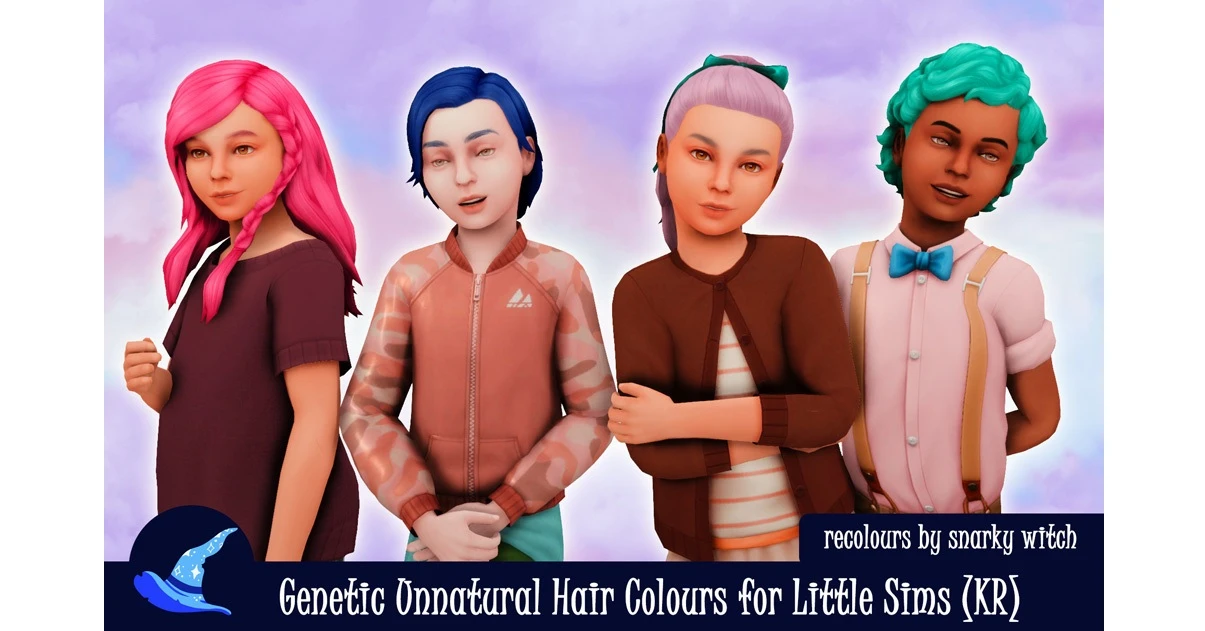
A small but welcome compatibility touch. By the game's logic, unnatural hair colors – blue, green, pink, and so on – are only available for Sims teen-aged and older. Children wear a "normal" color from their genetics until they age up, at which point they get their unnatural color.
If you have the mod Genetic Unnatural Hair Colours for Little Sims by SnarkyWitch installed, the Main Mod picks it up automatically and applies the unnatural color starting from infancy. No extra setup needed.
Occult Mutations
This feature is off by default and is aimed at players who want to inject a little unpredictability into their game. With it enabled, a child has a chance of being born as a different occult type than their parents, and not just a random one. You set the probability for each occult type individually.
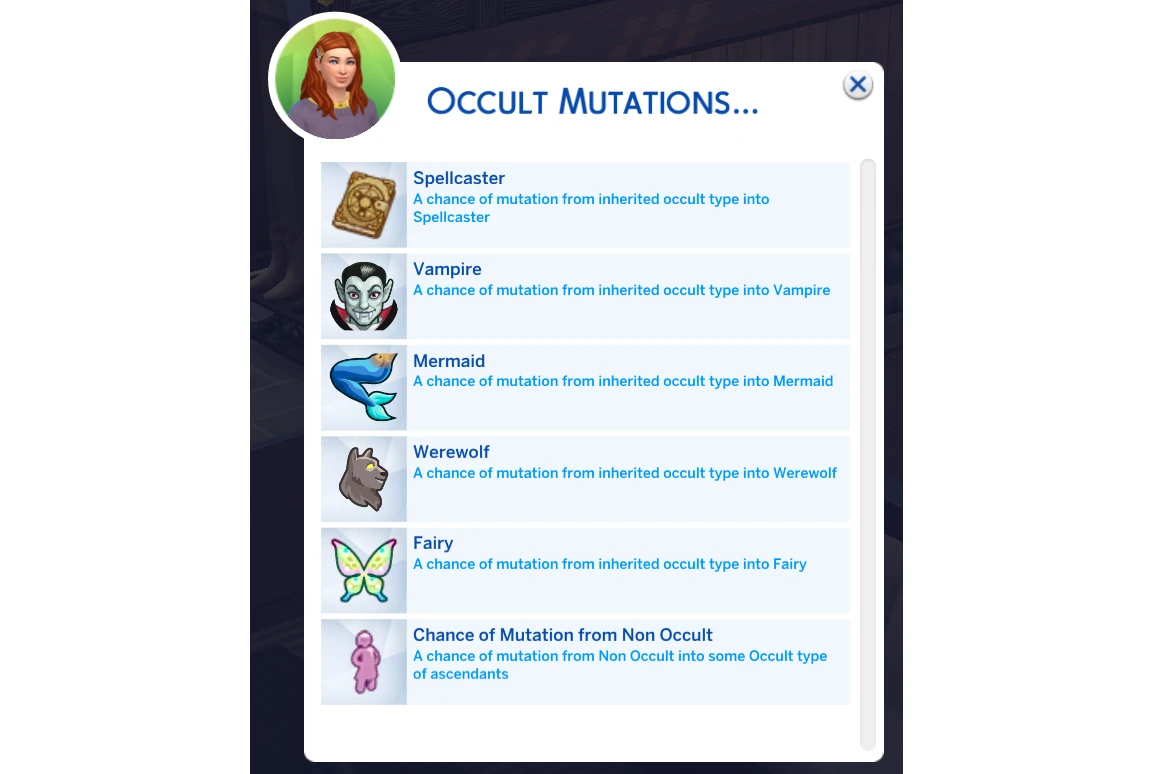
But before tweaking the mutation settings, it's worth understanding how occult type inheritance actually works in the base game. SonozakiSisters broke it down like this:
"All occults are handled through regular hidden character traits, so a child simply inherits a random occult type – or none at all – from a parent. My optional mutation settings just swap one occult trait for another at a player-defined chance."
And this is where one of the most surprising things we learned in our conversation with the creator comes in:
"At the code level, the game already supports multiple occult traits on a single Sim at the same time. The issue is purely on the UI side – there needs to be a way to display multiple occult meters and, depending on the specific types, multiple occult forms simultaneously. So mods that add occult hybrids aren't building that system from scratch, they're helping the attributes of different occult types coexist in a way the game already technically allows."
So occult hybrids aren't a hack, and they're not working against the game's logic. The game has always supported multiple occult types on a single Sim at the code level. EA just never built a UI for it. Hybrid mods are simply finishing what was already there.
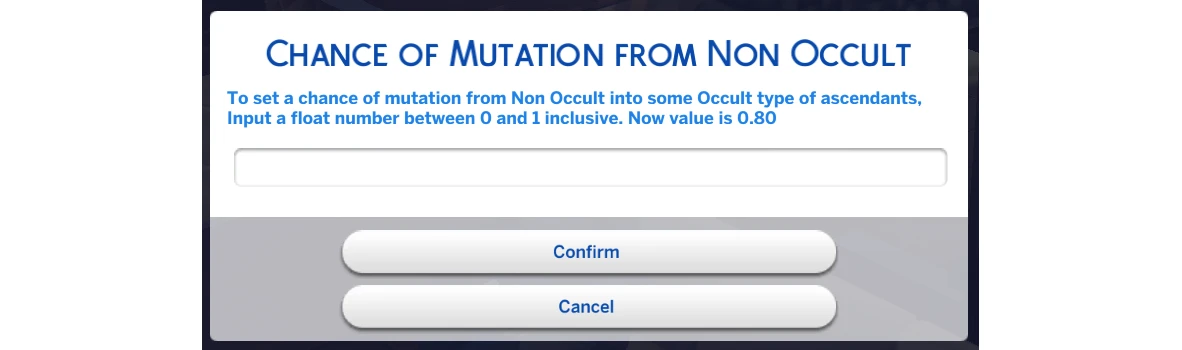
As for the mutation settings themselves: beyond the per-occult-type chances, there's a separate parameter – chance of mutation from non-occult. This controls whether a human child can become an occult at all if none of their ancestors were that type. If this value is set to zero, it doesn't matter what chances you've set for individual types – a regular Sim simply won't become an occult.
Ghosts and aliens are intentionally left out of the mutation system: aliens, lore-wise, come from Sixam, and ghosts are essentially the souls of dead Sims. Throwing them into a pool of random mutations would just feel narratively off.
On Preset Inheritance: How It Actually Works
Our conversation with SonozakiSisters turned up something interesting about how the game handles face presets:
"Even without mods, children don't necessarily inherit the exact same preset as their parent. You could say the game operates with groups of similar presets, and the inherited preset is picked randomly from within that group."
In other words, even in the base game, a child doesn't just copy their parent's nose, they get one of several similar noses from the same "group." That's not a bug; it's an intentional mechanic designed to create variety while still maintaining family resemblance.
The problem crops up with CC presets: they don't belong to any group, so the game simply ignores them during inheritance. SonozakiSisters is considering manually adding support for popular custom presets to that table in a future update – it can't be automated, but the list can be expanded by hand.
Another thing that came up during testing: the game also completely ignores occult form presets. When a werewolf child is created, the werewolf parents' presets play no part in the genetics whatsoever. Only the regular "human" presets matter.
The practical takeaway: if you're planning to have children with a Sim who has a CC face preset, you're better off swapping it out for a vanilla one first. Otherwise the child might end up with a completely different face – and that's not on the mod.
On Slider Inheritance: Details from the Creator
Sliders are a whole other story. By default, the game inherits them randomly, with no connection to where the preset came from. The mod improves on this: if a child inherited their nose from their grandmother, they'll also inherit all the nose sliders from their grandmother – not a mismatched mix pulled from different sources. The result is a face that feels more coherent and natural.
With CC sliders, things get more complicated:
"Unlike presets, the game has no problem inheriting CC sliders – but they're inherited randomly. For base-game sliders, I was able to improve the algorithm so the game pays attention to which part of the face or body a slider belongs to. That's not possible with custom sliders, because at the script level there's simply no data about which facial region a CC slider corresponds to. I'd love to put together a table for popular sliders, similar to what I'm planning for presets."
Recreate Offspring: Your Safety Net When Things Go Wrong
This is one of those features that's easy to overlook, until you actually need it. And behind it lies one of the most surprising technical details the creator shared with us.
Starting with version 1.1, the mod automatically saves a report for every newborn Sim – including NPCs and pets – to a dedicated reports folder. The report contains all the genetic data that was applied at birth. Using the cheat Shift + click on the mother → Recreate Offspring, you pick the second parent, select the relevant child's report, and the mother gives birth again to a Sim with those exact same preset genetic values. It's a lifesaver for situations where the mod generated an interesting child but something went sideways and the Sim ended up looking buggy.
But how does it actually work under the hood?
"To make this possible, the mod saves what's called a seed – a number that, at the code level, locks in how randomness plays out. By passing the same seed every time, the game makes all the same random choices it did before."
And here's where it gets really surprising:
"Without MCCC and my mod, the game doesn't store the seed during pregnancy at all. In fact, the data is never locked in at any point. Absolutely every time the game does anything in the pregnancy module, all offspring data – including the number of children and their gender – gets regenerated from scratch. And this doesn't just happen at birth, or when eating strawberries or apples, or when asking a doctor about the gender. It also happens when, among other things: loading into the game, switching between households, entering and exiting CAS. Basically, a whole range of background processes can overwrite all of that data."
In other words: in the base game, a child's gender, count, and genetics aren't locked in at the moment of conception. They're regenerated whenever the game gets the chance – and yes, strawberries and apples do work in that system, but only until the next event that resets everything. Open CAS and close it, and your baby might already be a different gender.
"MCCC, on the other hand, saves the seed when the pregnancy is created, so no subsequent event can change the genetics, gender, or number of children. That means with MCCC installed, eating strawberries is pointless. But you can go for an ultrasound once through a realistic birth mod and actually know what to expect."
A few requirements for the Recreate Offspring cheat to work:
- The Sim must be part of the active household and present on the home lot
- They must not already be pregnant
- The household must have no more than 7 Sims
- A saved child report must exist for the selected pair
The original "bugged" Sim is not deleted automatically – that has to be done manually, for example through MCCC. The new Sim doesn't receive a report of their own, to avoid creating an endless loop of identical data.
Module Two: Better Inheritance – Skin Tone and Archetypes Done Right
This module handles how skin tone, eye type, and hair color "archetype" – not just the shade, but the underlying type – are inherited. And here, just as with the Main Mod, the base game performs far worse than it might seem at first glance.
SonozakiSisters laid out the problem in detail:
"The game ignores most of the parents' skin tone characteristics, only paying attention to the base hue – warm / neutral / cool / occult – and then blends approximate values using an equally buggy algorithm."
The results of that "blending" are often all over the place: two dark-skinned Sims can end up with a light-skinned child out of nowhere. The blending function is just as locked down from modders as the genetics core itself, it can't be fixed, only worked around. So that's exactly what the mod does: it disables skin tone blending entirely and instead makes the game factor in the saturation and brightness of each parent's skin tone, as well as their race.
A child now inherits either one parent's skin tone or the other's – no in-between. MCCC has a similar setting, but with one key difference: MCCC only works in live mode, while this module works in CAS as well.
Race also factors into other characteristics – eye color and hair color. That's how the module reduces the odds of generating, say, a dark-skinned Sim with platinum blonde hair and Asian-type blue eyes. The creator does note: if the relevant attributes carry incorrect tags, those combinations can still slip through. But at that point, the problem lies with the CC quality, not the mod.
Module Three: No Weird Age Up and Random Genetics
This module tackles random Sim generation and appearance changes on aging up. And once again, there's an interesting technical story hiding underneath.
SonozakiSisters explained how the system works under the hood:
"The game has slider application templates for each life stage, gender, and occult type. These templates define the randomization range for slider values, the base value, and the limits for manual adjustment. These templates are applied both when generating a new Sim and when a Sim transitions from one life stage to another – whether through normal gameplay or in CAS."
The problem is that many sliders have no randomization cap at all, and some are even worse: the randomization is locked in one direction but left wide open in the other. The most glaring example is the notorious small chin issue:
"That particularly frustrating problem exists solely because the developers, for whatever reason, disabled randomization in the direction of a larger chin while leaving a wide limit in the direction of a smaller one. So even if the previous generations had perfectly normal chins, there's a good chance their descendant ends up with a smaller one. And that's the root cause of many other issues too – strangely sized facial and body features, or their odd positioning relative to each other."
This isn't an accident or an oversight – it's a specific decision in EA's code, and we see the consequences in every other randomly generated family. The module rewrites all of these templates, setting sensible lower and upper bounds for eye, lip, and nostril sliders, nose and mouth positioning, brow angles, shoulder width, and a number of other parameters.
NPCs won't come out picture-perfect, and presets can still let things down. But genuinely unsettling faces will show up a lot less often. The creator recommends pairing this module with Presets Selection for Randomized Sims by SimplyAnjuta, a mod that excludes unattractive presets from NPC randomization.
Compatibility: What Works and What Doesn't
The mod is compatible with most popular mods: Wonderful/Wicked Whims, MCCC, Relationship & Pregnancy Overhaul, NPC Family Genetics Fix, occult hybrid mods, and so on.
MCCC deserves a special mention:
"MC Command Center has quite a few settings related to capping genetics randomization. You'd think that would cause a conflict – but it doesn't, because MCCC only steps in and applies its additional restrictions when a child ages up to a teen. My mod, on the other hand, intervenes at birth. So with a couple of MCCC settings turned off, the two mods work together just fine."
For smooth compatibility, you'll need to disable two settings in MCCC: Use Parent Physical Attributes and Use Parent Skintones, both found under CAS → Offspring.
As for the rare compatibility exceptions, SonozakiSisters flagged two specific cases:
"There are a couple of exceptions where other mods trigger the hidden offspring creation process directly. The first is when WickedWhims generates a family tree icon for a child that was never born due to a miscarriage. I don't see any reason to ask Turbodriver to add compatibility with my mod – the whole point of that feature is just to mark the loss in the family tree, not to pass on any appearance data."
"The second exception is NPC Family Genetics Fix by Deadlystingnyc. It's a really handy little mod that makes the game apply the genetics system when generating children as part of a full NPC family. I'm in touch with the author, though, and after testing we'll release a compatible version if one turns out to be needed."
On the technical conflicts side:
- Better Inheritance conflicts with mods that modify the Client_GeneticTags file
- No Weird Age Up conflicts with mods that modify the Client_CASModifierTuning file
- Neither of these modules conflicts with MCCC
Limitations Worth Knowing About
- The mod has no effect on children created in CAS – the Create-a-Sim editor's code is off-limits to third-party developers
- At birth, Sims are temporarily given a default hairstyle – this is how the mod ensures hair color is applied correctly; you can change the style afterward
- Custom CC eyes without tags may not be recognized automatically – the color will need to be set manually via Shift + click
- The attraction system doesn't account for natural hair and eye color – only the Sim's current appearance. The creator considers this intentional: Sims should be attracted to how someone actually looks, not their biological baseline
Installation
The Main Mod requires the Lot51 Core Library – it won't run without it. The other two modules have no additional dependencies.
General installation steps:
1. Download the modules you want (links above)
2. Place the files in your Mods folder, no more than one subfolder deep
3. Don't delete the JSON file that comes with the main mod – that's where your settings are stored
4. When updating to version 1.2, only delete the old mod files; the settings file can be kept as-is
If the interactions aren't showing up in-game:
- Check that Lot51 Core Library is installed
- Make sure testing cheats are enabled: type testingcheats true in the console