
How to Use MC Dresser Config Files to Improve NPC Outfits in Sims 4
Using custom configuration files with the MC Command Center (MCCC) mod for The Sims 4 is a simple yet highly effective way to dramatically improve the overall visual appeal of your game. Rather than spending countless hours manually editing each and every randomly generated character, you can instead enjoy a lively, immersive world where all residents – both playable sims and non-playable characters (NPCs) – sport stylish, coordinated outfits thanks to these powerful MCCC clothing configs.

What Are Configuration Files for MC Command Center (MCCC)?
A clothing configuration for MCCC is a specialized file, typically with a .cfg extension, that contains pre-designed and saved outfit sets for sims of all ages and life stages. More specifically, these files store the clothing settings and fashion choices to be automatically applied by the mod. When you use such a configuration file together with the MC Command Center mod, the game automatically dresses newly generated NPCs in fashionable and thoughtfully coordinated looks instead of default, often mismatched, random outfits.
Key Features and Benefits of MCCC Clothing Configurations
— Affects Only Newly Generated Sims: These outfit configurations modify only the appearance of new sims generated after the config is installed.
— Does Not Alter Existing Sims: Already existing sims remain unchanged, though their outfits can still be updated manually if desired.
— Full Control Over NPC and Playable Sim Wardrobes: Configuration files allow you to control what outfits both NPCs and playable sims wear as they age up.
— Requires MC Command Center Installed: You must have the MCCC mod installed. Usually, optimal results require having most, if not all, The Sims 4 expansion packs and game packs.
— Stored in mc_dresser.cfg: MCCC generates a file named mc_dresser.cfg located within the mod's folder. This file contains all outfit parameters and can be replaced with custom or downloaded configs.
Community Authors’ Configuration Collections for MC Command Center
Before installing a new configuration, we suggest exploring popular, community-created outfit configuration files for MCCC in The Sims 4. Many talented creators share their configs online:
— NPC Outfits MC Dresser Config File by tiasha
— Fetch outfits for NPC, a config file for MC dresser by Joy
— Combined MC Dresser CFG Incl Infants by Simslegacy5083
— NPC Fashion by blackpanda
These configurations help ensure that sims in your game look polished and stylish.
Detailed Guide: Installing and Setting Up Custom MCCC Configurations in The Sims 4
Step 1: Preparation
Ensure you have installed the latest version of the MC Command Center mod for The Sims 4.
Step 2: Installing Your Outfit Configuration File
1. Download your chosen MCCC outfit configuration file (.cfg).
2. Open your game’s Mods folder by navigating to:
Documents > Electronic Arts > The Sims 4 > Mods
3. Locate the folder where MC Command Center is installed.
4. Place the downloaded configuration file into this MCCC folder.
Important: Before replacing the existing configuration file, make a backup copy of your original mc_dresser.cfg. This allows you to restore your previous settings if needed.
Step 3: In-Game MCCC Settings Configuration
Start The Sims 4 and load your desired save. Configure the necessary MCCC parameters:
On any in-game computer, go to:
MC Dresser > Outfit Settings > Use Only Saved Outfits > Enabled
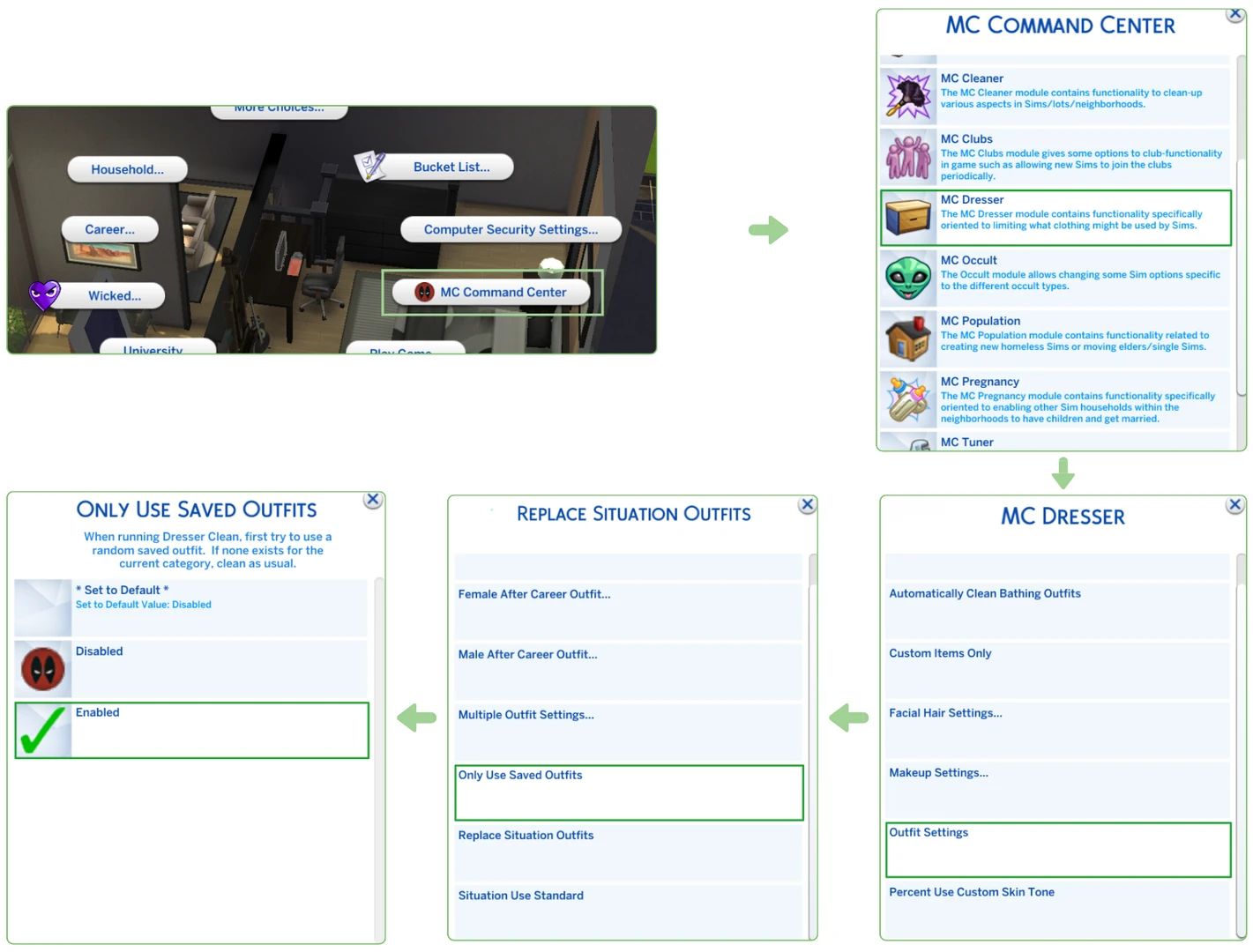
This instructs MCCC to use only the outfits specified in your configuration file, overriding random outfit generation.
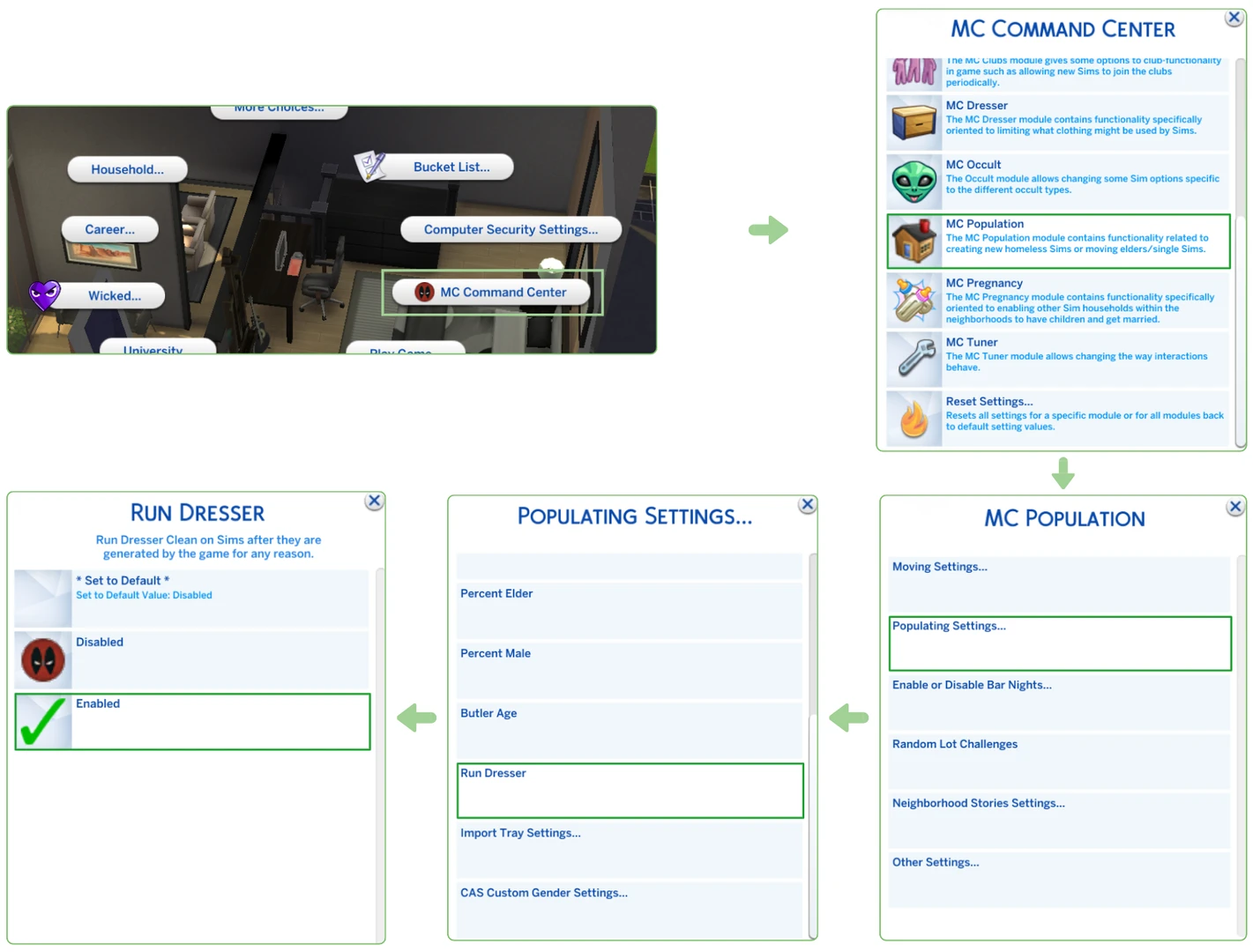
Next, enable outfit assignment for new NPCs:
MC Population > Population Settings > Run Dresser > Enabled
Step 4: Applying Outfits to Existing Sims
By default, custom configurations will affect only newly generated NPCs. To update the outfits of already existing sims, follow these steps for each existing character:
Click on the sim you wish to update and navigate through the menu to:
MC Command Center > MC Dresser > Outfit Commands > Random Saved Outfit
Repeat this for each clothing category if you want to completely refresh a sim’s wardrobe using the selected MCCC configuration.



