
The Sims 4 Banking System: Realistic Loans Without Mods
Many passionate players and fans of The Sims 4 often seek ways to bring more realism and immersion into their gameplay experience, especially when it comes to the in-game financial system. Loans and credit are an essential part of real-life finances and daily life for many people, yet, without mods or custom content, there is no built-in mechanic for bank loans, lending, or credit in The Sims 4 base game.

Luckily, thanks to the creativity and resourcefulness of the sims community, a unique and engaging way to roleplay a fully functioning loan system has emerged for The Sims 4.
What you’ll need to set up a bank and loan system in The Sims 4
To use this mechanic, you will need the “Get Famous” game pack, which features the “Duck Security© SCR009E Super XL Smart Vault” object (a vault or safe). This vault will serve as the foundation and main element of your custom-made banking system within your Sims 4 world.
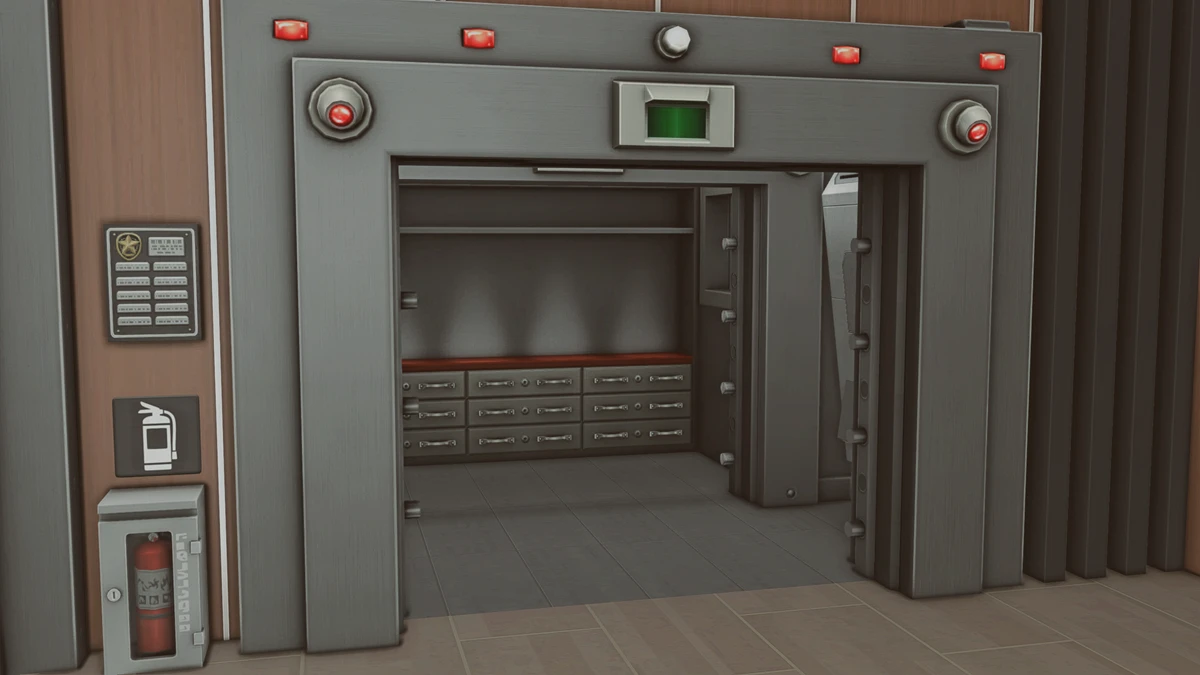
Step-by-step guide to roleplaying loans and credit in The Sims 4
1. Creating your own bank in The Sims 4
Begin by creating a special lot which will serve as your own in-game bank. You have two options: either designate a new community lot and place the smart vault there, or create a residential lot that houses a “banker” family. Choose whichever structure best suits your current storytelling style and gameplay preferences. Setting up a realistic-looking bank branch can further enhance the immersion and realism.

2. Funding your in-game bank
Next, the bank needs a reserve of funds. Pick any wealthy sim (perhaps create one for this specific purpose) and have them travel to the bank lot. Once there, deposit a significant sum of simoleons into the vault: the amount becomes the working capital the bank can use for granting loans and credit to other sims. If you are playing with a family of sims who act as bankers, you can use money cheats to give them the desired starting funds, and then deposit the cash into the vault. The crucial part is to leave the vault unlocked after funding.

3. Meeting with the banker NPC
Visit the bank in person and interact with any NPC present. This sim will serve as your banker – they will “decide” whether your loan application is approved or rejected. Simulating a banking conversation can make the process more authentic and fun.

4. Preparing the loan documents
Once your sim is ready to apply for a loan, head home and write a book (using a computer). Title this book “Document Package” to signify the typical paperwork needed for a real-life loan process, such as loan applications, income statements, and lending contracts.

5. Submitting your loan application
Return to the bank, ensuring that the banker is added to your group. Locate your banker sim and give them the “Document Package” by gifting it. Pay close attention to their in-game reaction: if the banker gives a thumbs up, the loan application is approved and the documents are accepted. If your sim receives a thumbs down, the loan request has been denied. In this case, write a new set of “Document Package” paperwork at home and repeat the application process. Persistence pays off!

6. Receiving the loan sum
With your loan approved, head to the vault and withdraw the required sum of money. Congratulations, your sim now has an active loan and is officially a borrower in your custom Sims 4 financial system.


7. Scheduling repayments and loan installments
To manage loan repayments and keep track of your debt schedule, make use of The Sims 4’s in-game calendar feature. Set up a series of new “holidays” to act as reminders for payment due dates. Decide ahead of time how much your sim needs to pay back each period (including optional interest for greater realism). On each payment date, visit the bank and redeposit the agreed sum into the vault. Repeat until the original amount (or more, if you're charging interest on the loan) has been repaid to the bank.

Additional tips for a more realistic Sims 4 banking roleplay experience
— Add complexity by calculating true-to-life interest rates – returning 10–20% more simoleons than were borrowed.
— Keep a record of outstanding debts in a notebook, spreadsheet, or custom file.
— Create realistic consequences for missed or late payments, such as late fees, reduction in bank favor, or even repo events.
— Enhance the realism by decorating your Sims 4 bank lot with teller desks, waiting areas, and other details to mirror real-world banks.



